

Best Practices for AI Call Transfers
Save $1,800+ monthly while cutting call resolution time by 40% with smart AI transfer strategies that work for any business size.

Written by
Adam Stewart
Key Points
- Use warm transfers to boost satisfaction scores by 25%
- Route to team queues vs individuals to prevent missed calls
- Pay $0.025 per call vs $150/month per live agent
- Set smart routing rules based on caller intent and agent skills
AI call transfers ensure seamless communication between customers and human agents, especially for small and medium-sized businesses (SMBs) that can't afford full-time phone teams. Here's what you need to know:
- Cold vs. Warm Transfers: Cold transfers connect callers to agents without context, while warm transfers provide agents with a quick summary of the caller's issue, ensuring smoother interactions.
- Why It Matters: Poor handoffs frustrate customers, with 73% preferring businesses that respect their time. Warm transfers reduce resolution time by 40% and improve satisfaction.
- Cost Efficiency: AI transfers cost $0.025 per call, significantly cheaper than traditional call centers ($100–$200/month per agent).
- Routing Options: Static routing sends calls to fixed destinations, while dynamic routing adapts based on real-time data, improving resolution times by 40%.
- Key Triggers: Transfers should occur for direct requests, unresolved issues, or sensitive topics, ensuring meaningful escalations.
- Smooth Handoffs: Passing context (caller details, issues, mood) and using real-time transcription ensures agents are prepared, reducing frustration.
Tools like Dialzara simplify this process, offering 24/7 AI-powered call management, warm transfers, and integration with thousands of business apps. SMBs can save time, reduce costs, and enhance customer experiences.
Key Models for AI Call Transfers
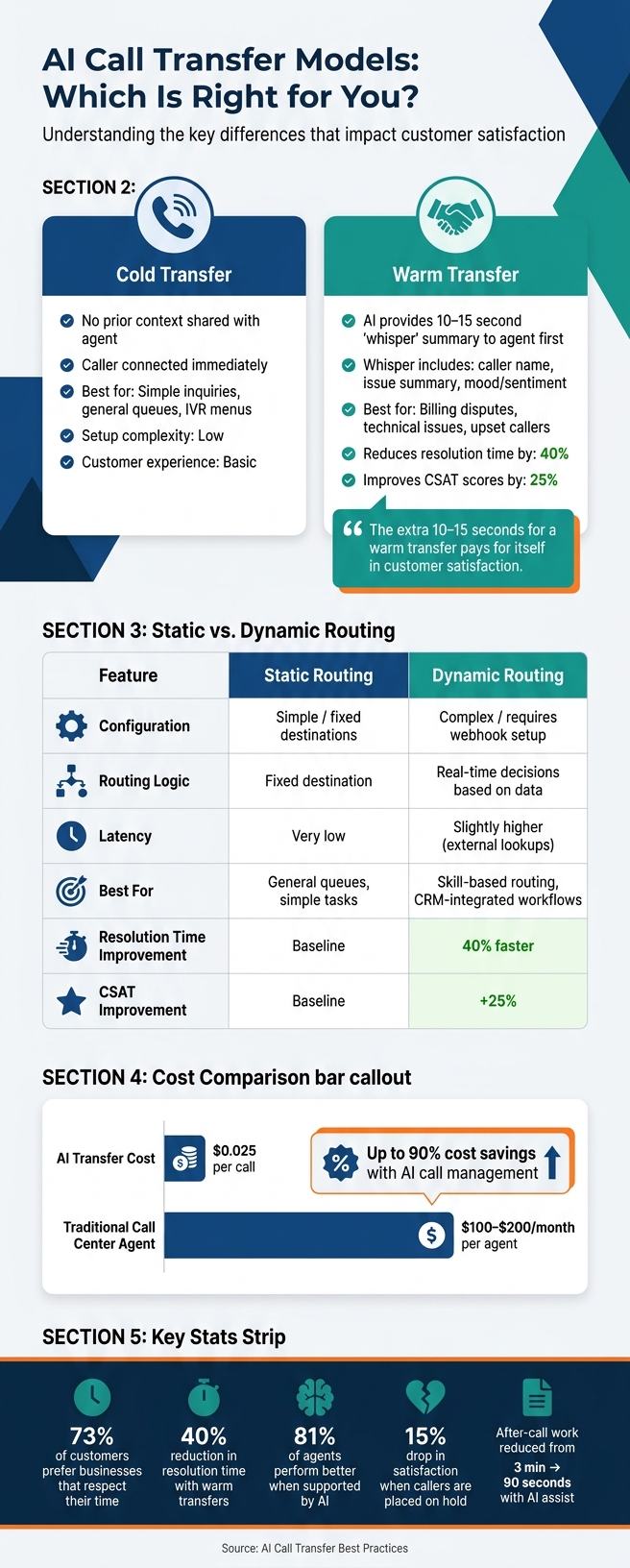
Cold vs. Warm AI Call Transfers: Key Differences & Stats
Understanding transfer models is crucial for setting up smooth, customer-friendly call workflows.
Cold vs. Warm Transfers
Cold transfers connect the caller to an agent without any prior context. These are best for simple inquiries where no additional background is needed. On the other hand, warm transfers take a more thoughtful approach. In this case, the AI briefly places the caller on hold, contacts the agent first, and provides a quick "whisper" summary. This whisper includes the caller's name, their issue, and even their mood. After this preparation - usually just 10–15 seconds - the caller is brought into the conversation. This small step can make a big difference in how customers feel about the interaction [2].
"The extra 10-15 seconds for a warm transfer pays for itself in customer satisfaction." - CallSphere Team [2]
Cold transfers are ideal for routing to general queues or automated IVR menus. Warm transfers, however, shine in situations like billing disputes, technical problems, or when the caller seems upset [2][3].
Once the transfer type is chosen, routing logic comes into play to streamline call management further.
Static vs. Dynamic Routing
Static routing sends calls to a predetermined destination, while dynamic routing adapts based on real-time data - like the caller's language preference or VIP status. Dynamic routing can cut resolution times by 40% and increase customer satisfaction scores (CSAT) by 25% [1].
| Feature | Static Routing | Dynamic Routing |
|---|---|---|
| Configuration | Simple; fixed destinations | More complex; requires webhook setup |
| Routing Logic | Fixed destination | Real-time decisions based on data |
| Latency | Very low | Slightly higher due to external lookups |
| Best For | General queues, simple tasks | Skill-based routing, CRM-integrated workflows |
When neither static nor dynamic routing fits the situation, fallback options ensure service continuity.
Other Escalation Options
If no agents are available, the AI can switch to voicemail or message-taking mode. In this mode, it collects the caller's name, contact information, and the reason for their call. This ensures that no lead or request is missed, and follow-ups can happen promptly.
Dialzara simplifies all of these processes. It handles cold and warm transfers, applies routing rules, and seamlessly switches to message-taking when needed. The result? A smoother, frustration-free experience for callers.
sbb-itb-ef0082b
How to Set Up AI Call Transfers
Once you've chosen your transfer model, it's time to configure your system. This involves setting up your phone system, routing calls to the right destinations, and defining the triggers for when transfers should occur.
Preparing Your Phone System
Start by ensuring you have a business phone number and call forwarding enabled. At least one active line - whether local or toll-free - is essential. You'll also need admin access to manage forwarding settings. For U.S. landlines, most carriers allow call forwarding setup using *72 or through their online portals.
If you're using a service like Dialzara, you’ll pick a phone number for your AI agent and forward calls from your existing business number to it. This process is simple and doesn’t require technical expertise.
One common mistake to watch out for is voicemail loops. This happens when your AI agent transfers a call to a number that forwards back to the AI, trapping the caller in an endless cycle. Always test your transfer paths thoroughly before going live to avoid this issue.
Once your phone system is ready, focus on setting up clear and effective call routes.
Configuring Transfer Destinations
When routing calls, prioritize teams or departments over individual people. For example, if you route calls directly to "Mike in Sales" and he’s out sick, those calls will go unanswered. Instead, set up a "Sales Team" ring group so calls are handled even if someone is unavailable.
Here’s an example of how small and medium-sized businesses (SMBs) might structure their destinations:
| Destination | Use Case | Fallback |
|---|---|---|
| Sales queue | New inquiries, estimates | Voicemail with callback option |
| Support queue | Existing customer issues | Secondary support line |
| Billing team | Invoices, payment questions | Billing voicemail |
| On-call/urgent | Emergencies, critical issues | On-call mobile number |
For every queue, define a primary destination and at least one backup. For example, if the primary destination isn’t reached within 20 seconds, the AI should attempt the backup. If both fail, the system should offer voicemail or AI callback options. This ensures no calls are dropped and customers aren’t left hanging.
With destinations in place, the next step is to define what triggers a transfer.
Defining Transfer Triggers
Set clear and concise rules for when calls should be escalated. The most reliable triggers include:
- Direct requests: Phrases like "Can I speak to someone?" or "I need your billing department."
- Repeated unanswered questions: If the AI can’t resolve an issue after two attempts, escalate.
- Complaint or frustration signals: Language indicating dissatisfaction or the need for human support.
- Sensitive topics: Issues like payment disputes, legal questions, or anything involving personal or medical information.
Be cautious about over-triggering. For instance, vague pauses or ambiguous questions shouldn’t automatically escalate, as this could overwhelm your team. Focus on high-confidence signals to ensure escalations are meaningful and necessary.
Once these triggers are set, you can shift your attention to making the handoff process as smooth as possible for your callers.
How to Design Smooth Human Handoffs
A good transfer trigger is only part of the equation. The moments between the AI ending its interaction and the human agent saying "hello" can make or break the caller's experience. It’s the difference between feeling cared for or feeling ignored.
Passing Context During Warm Transfers
A warm transfer isn’t just about connecting the caller to a human - it’s about making sure the agent is fully prepared to step in. This means passing along key details like the caller’s name, contact information, a summary of their issue, any steps already taken, and unresolved concerns. If the caller’s identity has already been verified, that information should carry over so they don’t have to repeat the process.
In addition to these essentials, AI-generated insights like sentiment analysis techniques, urgency levels, and intent classifications can help the agent understand the caller’s emotional state and the importance of their issue.
"An AI that transfers without context is worse than IVR - at least IVR doesn't waste a caller's time capturing details that then disappear." - SIMBA Voice Agents [5]
Using Real-Time Transcription
Once the context is gathered, keeping it updated in real time becomes crucial. Automatic speech recognition (ASR) should run continuously during the call, even through transfers, to create a complete record. The receiving agent should have access to both a brief AI-generated summary and the full, timestamped transcript before the caller is connected [4].
A layered approach works well here: show a one-line summary at the top (e.g., "Caller is disputing a $120 charge from last month") while making the full transcript available for deeper review. This ensures the agent has a clear understanding of the situation. For example, in May 2026, Propel Holdings used Cresta's AI Agent and Agent Assist to streamline operations, cutting after-call work time from 3 minutes to just 90 seconds and achieving a 58% chat containment rate [4].
Setting Expectations for Callers and Agents
Once the context is ready, clear communication is critical for both callers and agents. For callers, a specific pre-transfer message works best, such as: "I’m connecting you to a billing specialist now - please hold for just a moment." Avoid vague phrases like "Let me transfer you", which can leave callers wondering if the call has been dropped. If no agent is immediately available, the AI should rejoin the call, explain the delay, and provide a clear callback window.
For agents, whisper messages can deliver a quick, private audio summary of the caller’s issue, tone, and any actions already taken before the call is bridged. Additionally, a screen pop showing the caller’s account history and transcript ensures the agent is fully briefed. In fact, 81% of agents report performing better when supported by AI technology [4]. Treating the handoff as a structured, intentional process rather than an afterthought makes all the difference.
How to Monitor and Improve AI Call Transfers
Once you've set up effective call transfers, the next step is keeping an eye on them and finding ways to make them even better. Regular monitoring ensures your system stays efficient and adaptable.
Testing Your Call Transfer Workflows
It's essential to test your transfer workflows in every possible scenario, including those tricky edge cases like when an agent doesn't respond or a SIP connection drops. These stress tests help you identify weak spots in your setup. Simulating failures - such as agent unavailability, dropped SIP connections, or disrupted caller audio - can reveal how your system performs under pressure [6][9].
Another key step is A/B testing your handoff triggers. Experiment with different conditions like sentiment thresholds, keywords, or intent detection. For instance, you might discover that transferring based on detected frustration works better than relying on a keyword-based trigger [7].
Measuring Transfer Performance
Tracking the right metrics is crucial for understanding how well your system handles transfers. Here are a few to focus on:
- Transfer Rate: This shows the percentage of calls needing human intervention. A high rate might indicate the AI isn't equipped to handle common queries or that routing logic could use fine-tuning [8].
- Time-to-Transfer: This measures how quickly a call moves from trigger to connection, giving insight into latency issues.
- Post-Transfer Resolution Rate: This evaluates whether the handoff actually resolves the caller’s issue.
Metrics like CSAT (Customer Satisfaction Score) and first-call resolution can take a hit when transfers are poorly executed. For example, satisfaction drops by as much as 15% if callers are placed on hold [7][8]. By consistently tracking these numbers, you can pinpoint areas for improvement and adjust accordingly.
"Milliseconds of latency and loss of context can frustrate customers." - Eli Mogul, Telnyx [7]
Adjusting Prompts and Routing Rules
Once you've gathered performance data, use it to make precise adjustments. For instance, if one routing path has a high transfer rate, it could mean the AI prompt needs tweaking - maybe the intent detection is missing the mark, or the AI doesn't have enough information to resolve the issue. Refine the prompts, test the changes, and measure the results.
Real-time dashboards can be a game-changer for spotting and fixing issues as they happen. Instead of waiting for weekly reports, you can catch problems like increased transfer latency or lower resolution rates on the same day. This allows you to adjust routing rules quickly, preventing a small issue from turning into a big one. Keep refining your system based on real-time insights [6].
Conclusion
Getting AI call transfers right boils down to a few critical choices: selecting the right transfer model, setting up clear triggers, and ensuring that the caller's context moves seamlessly between the AI and the human agent. When these elements align, the entire handoff process feels smooth rather than frustrating.
The greatest benefits come from warm transfers and real-time transcription. By passing caller intent to a human agent before they even pick up, you can significantly reduce handle time and eliminate one of the most common frustrations - having to repeat information. Combine that with regular monitoring and weekly routing audits, and your system becomes smarter and more efficient over time.
For small and medium-sized businesses, the hurdle is achieving this without the need for a dedicated IT team or a hefty budget. That’s where Dialzara comes in. It takes care of the heavy lifting - screening calls, managing routing logic, and executing transfers - while integrating with over 5,000 business tools. Setup is quick and simple, taking just minutes instead of weeks, and businesses can cut costs by up to 90% compared to top AI phone answering services. With AI handling routine calls 24/7, your human team can focus on the calls that truly need their attention.
The outcome? A streamlined, responsive phone system that grows with your business - without adding unnecessary complexity or headcount.
FAQs
When should my AI transfer a call to a human?
When an AI reaches the boundaries of its capabilities, it should transfer the call to a human representative. This is especially important for handling complex issues, emotional concerns, or situations where the AI cannot provide a resolution. Key triggers for such handoffs include:
- Low confidence in responses: When the AI struggles to provide accurate or relevant answers.
- Errors in intent recognition: If the AI misinterprets the customer’s needs or requests.
- CRM synchronization problems: When the AI cannot access or update customer data properly.
- Conversations beyond its scope: If the issue falls outside the AI’s programmed knowledge or expertise.
To ensure a smooth transition, the AI should provide the human agent with full context - this includes the conversation history, customer details, and any attempted solutions. This approach helps maintain a seamless experience and leaves the customer feeling supported and valued.
What context should be included in a warm transfer?
When performing a warm transfer, make sure to pass along the caller’s conversation history, their needs, and any other important details gathered during the interaction. This spares the customer from having to repeat themselves, which can be frustrating.
Before the handoff, take a moment to brief the receiving agent with key information, such as the caller’s intent and any relevant data. This helps maintain continuity in the conversation. Proper preparation not only improves the customer’s experience but also ensures the transfer process goes smoothly.
How do I prevent call transfer loops and failed handoffs?
To prevent frustrating call transfer loops and failed handoffs, it's essential to set up your AI system with clear transfer logic and well-defined triggers. For smoother transitions, use warm transfers - this ensures that any relevant context is passed along to human agents, saving customers from having to repeat themselves.
Define triggers for transfers, such as:
- Low AI confidence in handling the query
- Specific customer requests to speak with an agent
- Complex issues that require human intervention
Finally, make it a habit to regularly test and monitor your system. This helps you address potential problems early and fine-tune transfer accuracy over time.
Summarize with AI
Related Posts
Common AI Agent Issues and How to Fix Them
Diagnose and fix common AI phone agent failures — intent recognition, integrations, call quality, conversation flow, and system health with monitoring and targeted fixes.
How AI Reduces Errors in Call Transfers and Messages
How AI improves call transfers and message handling with intelligent routing, real-time transcription, and 24/7 automation to reduce misroutes, errors, and costs.
Can We Set the AI to Hand Off to a Human Automatically If It Becomes Less Confident During Complex Questions?
Learn the best practices for seamless AI to human handoffs in customer service. Utilize sentiment analysis, maintain chatbot conversation history, optimize agent availability, and more.
AI Agent Software: How Intelligent Handoff to Human Agents Actually Works
Explore how AI agents enhance customer service by efficiently handling calls and transferring complex inquiries to human agents for a seamless experience.