
AI Voice Assistants for Retail: Integration Guide
Cut customer service costs by 70% and boost satisfaction to 93% with AI voice technology that handles retail inquiries in real-time.

Written by
Adam Stewart
Key Points
- Start with simple, high-volume calls before tackling complex workflows
- Connect AI directly to your CRM and POS for instant, accurate responses
- Test real-time data sync - delays kill customer trust fast
- Voice commerce hits $40B by 2026, giving early adopters an edge
AI voice assistants are transforming retail by handling customer calls with human-like conversations. They use advanced tech like NLP and NLU to manage tasks such as checking inventory, answering store hours, and processing orders. Retailers report benefits like a 25% increase in foot traffic and 93% caller satisfaction. These systems save time, cut costs, and improve customer service by automating routine inquiries 24/7.
Key Takeaways:
- What They Do: AI assistants manage calls, check stock, track orders, and more.
- Why Retailers Use Them: Faster responses, reduced costs, and optimizing AI voice assistants for improved customer experience.
- How to Integrate: Connect systems like CRM, POS, and inventory databases.
- Platform to Try: Dialzara offers a quick setup, retail-specific features, and a 14-day free trial.
By automating common queries and freeing up staff, AI voice assistants help retailers focus on in-store customers while boosting efficiency and sales.
AI Voice Assistant Integration Process for Retail: 4-Step Implementation Guide
Assessing Your Retail Systems for AI Integration
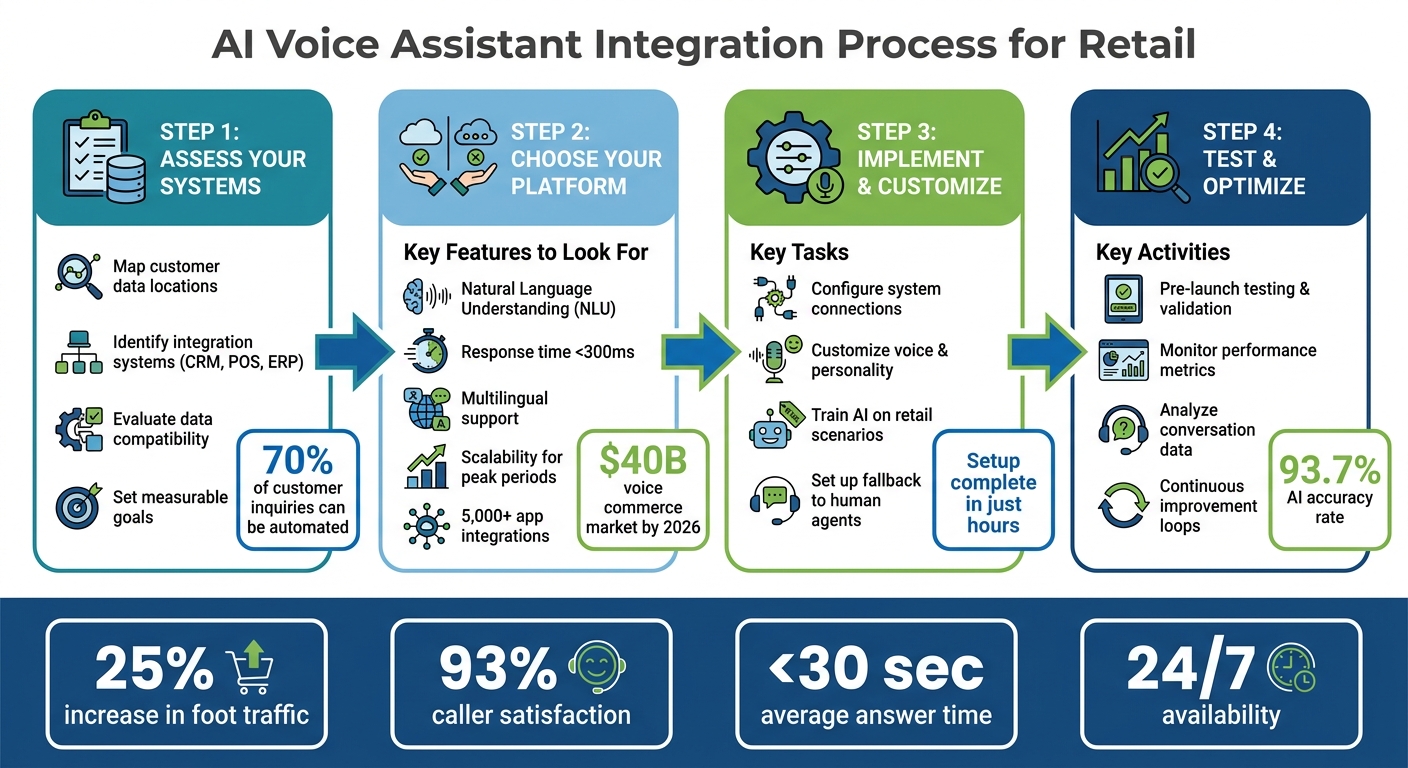
Before you can connect an AI voice assistant to your retail setup, it’s essential to take stock of your existing systems. Retail operations often rely on a mix of technologies - modern CRM platforms, older ERP systems, and POS solutions [2]. Start by mapping out where your customer data is stored, evaluating how current it is, and checking if your systems can communicate effectively. From there, focus on identifying the systems that are critical for integration, ensuring secure data flow, and setting clear, actionable goals.
Identifying Systems for Integration
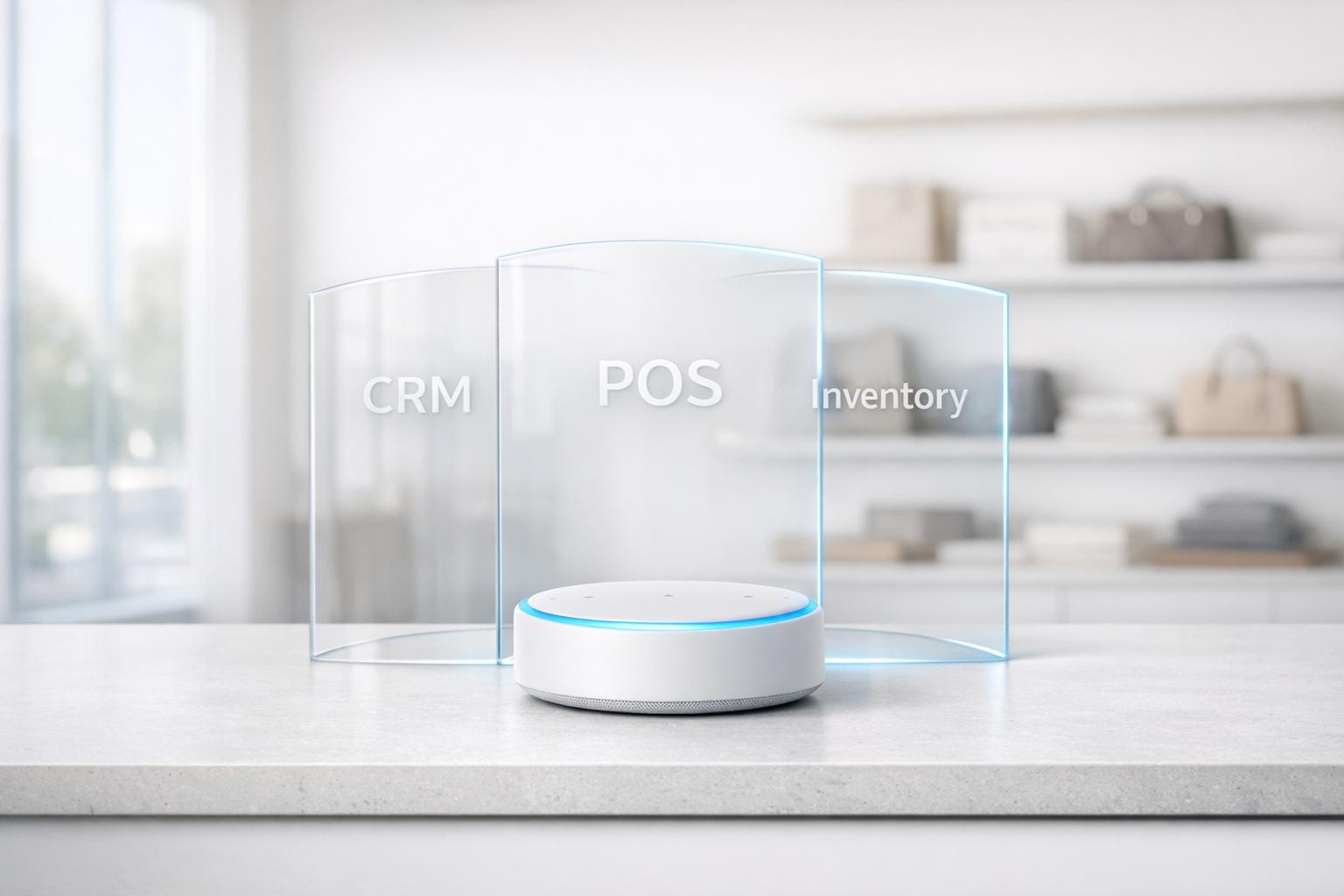
Begin by listing the systems that handle customer interactions, with CRMs being a top priority. CRMs often store vital information like customer profiles, purchase histories, and loyalty points. When linked to a voice assistant, these systems can autonomously handle up to 70% of customer inquiries [3].
Next, turn your attention to your inventory management system. By connecting this system, the AI can provide real-time stock updates and suggest alternatives for out-of-stock items [2]. Your POS system is another key player - it supports transaction-related tasks such as verifying loyalty rewards, processing returns, or checking recent purchases [2]. If you’re running both physical stores and an online platform, integrating these systems ensures consistent product details and pricing across all channels [2]. Finally, include order management and tracking systems so the AI can offer instant updates on shipping and delivery timelines [2]. Once you’ve identified these systems, evaluate how they share and update data securely.
Evaluating Data Compatibility and Security
After pinpointing the systems for integration, confirm that they can effectively communicate. Some older ERPs and POS systems may need middleware or API gateways to enable smooth data exchange. Keep in mind that even a brief two-second delay during a voice interaction can significantly impact the customer experience [2].
Data accuracy and timeliness are equally crucial. Your databases should update in real time to avoid serving outdated information. As Rootstack explains:
"If the voice agent is trained on static data or accesses a database that updates only once a day through batch processing, it will deliver outdated information - leading to immediate customer frustration and loss of trust" [2].
To keep data current, consider transitioning to an event-driven architecture with tools like Kafka or RabbitMQ. These systems ensure that your AI has access to the latest information [2].
Setting Integration Goals
Rather than vague objectives like "enhance customer service", set specific, measurable goals. Start with straightforward, high-volume use cases - such as store hours, order tracking, and basic inventory checks - to test and validate your system before tackling more complex workflows [2].
Prepare fallback strategies for when human intervention is needed. Implementing a robust AI answering service can help manage these transitions smoothly. Even with modern AI achieving a 93.7% accuracy rate, about 6 out of every 100 calls may still require a human touch [4]. By taking a structured approach, you can align your integration with a streamlined deployment process, minimizing customer frustration and protecting your brand reputation during the AI’s learning phase.
sbb-itb-ef0082b
Choosing the Right AI Voice Assistant Platform
After mapping your systems and defining your integration goals, the next step is picking a platform that meets your retail needs. The right platform should deliver robust technical capabilities, integrate seamlessly with your existing tools, and get up and running quickly. With voice commerce expected to hit $40 billion globally by 2026, deploying a system that feels outdated or clunky is not an option [5]. Your chosen platform should handle natural, real-time conversations, handle peak shopping periods effortlessly, and align with your overall integration strategy. Below, we’ll explore the essential features, integration capabilities, and the specific advantages of Dialzara for retail businesses.
Key Features to Look For
When evaluating platforms, focus on features that support accurate, real-time customer interactions. For starters, prioritize Natural Language Understanding (NLU). This ensures the AI can interpret and respond to varied customer queries without losing context. For example, if a customer asks, "Do you have the blue jacket in medium?" and follows up with, "What about large?", the system should recognize the context without requiring the customer to repeat themselves [2].
Response times are another critical factor. The platform should respond in under 300 milliseconds, as even a brief two-second delay can disrupt the conversation flow and frustrate customers [5].
Multilingual support is also a must-have. The ability to switch languages automatically allows the AI to serve diverse communities without forcing users to navigate complex menus [1]. Additionally, ensure the platform can handle seasonal traffic spikes. Retail events like Black Friday or the holiday rush can cause call volumes to triple overnight, so scalability is key. With 73% of consumers now favoring voice AI over traditional phone support, reliability during these peak periods directly impacts revenue [5].
Understanding Integration Capabilities
The effectiveness of a voice assistant depends heavily on its ability to integrate with your existing systems. Before committing to a platform, confirm it can connect in real time to your CRM, ERP, and POS systems. If you rely on older systems, ensure the platform supports middleware or API gateways to bridge the gap [2].
Consider platforms that support event-driven architecture. Unlike batch processing, which updates data only periodically, event-driven systems - using tools like Kafka or RabbitMQ - push updates instantly. This ensures customers get accurate, up-to-date information, such as whether an item is in stock [2]. As Digital by Default aptly stated:
"A voice commerce experience that cannot tell a customer whether something is in stock is not a voice commerce experience. It is a novelty" [5].
Also, review the breadth of integrations the platform offers. Some systems connect to only a handful of tools, while others provide thousands of pre-built integrations. This flexibility is crucial for syncing with appointment scheduling, loyalty programs, or marketing automation platforms without requiring costly custom development [2].
Benefits of Dialzara for Retail Businesses
Dialzara is tailored for small and mid-sized retail businesses that need fast deployment and seamless integration. It connects with over 5,000 business applications, including popular tools like Google Calendar, enabling automated appointment bookings for personal shopping or VIP consultations [1]. With its 24/7 availability, Dialzara ensures even after-hours callers can get immediate answers about store hours or product availability, avoiding the frustration of voicemail.
Retailers using Dialzara have reported a 25% boost in foot traffic thanks to answered calls. The platform achieves a 93% satisfaction rate, with most calls answered in under 30 seconds [1]. Setup is quick and hassle-free, taking just a few hours. Plus, Dialzara comes pre-configured to handle retail-specific tasks like managing item holds, special orders, and inventory checks, so you don’t have to start from scratch. For retailers wanting to test the waters, Dialzara offers a 14-day free trial, allowing businesses to see its impact with real customer calls [1].
Implementing and Customizing Your AI Voice Assistant
Once you’ve chosen your platform, the next step is to tailor it to your brand and integrate it with your systems. This is where a generic AI tool becomes a retail assistant that reflects your business’s personality and handles customer interactions effectively. From answering product questions to managing special orders, this phase ensures your assistant is accurate, efficient, and unmistakably yours.
Configuring System Connections
The first task is connecting your AI assistant to essential systems like your CRM, inventory database, and POS. If you’re using modern cloud-based tools, direct API connections can make this process much easier. For real-time updates, consider an event-driven architecture like Kafka or RabbitMQ. Pairing your AI with a read-optimized database such as Redis ensures immediate reflection of changes in inventory or order statuses.
Platforms like Dialzara simplify this process by allowing you to link your assistant with store details, inventory categories, and policies. Start small by focusing on high-volume, straightforward use cases - like store hours or order tracking - to test its effectiveness. Always plan for contingencies by including a warm handoff option, where calls seamlessly transfer to a human when needed. Once the technical setup is complete, it’s time to give your AI a personality that matches your brand.
Customizing Voice and Personality
Your voice or text AI assistant should represent your brand, not feel like a generic chatbot. Start by defining your brand’s tone, values, and the type of experience you want customers to have. This includes configuring the assistant to understand store policies and inventory categories, so it can provide consistent and accurate information across all locations.
For example, if your store offers free returns within 30 days or specific item hold policies, the AI must communicate these details clearly. Choose a voice and tone that resonates with your audience and consider enabling multilingual support to cater to a diverse customer base. Platforms like Dialzara even allow you to program the assistant for tasks such as managing item holds, processing special orders, and promoting events. You can also set it up to proactively share information about sales or promotions to encourage immediate visits to your store. With an intuitive setup process, your AI can often go live within hours. Once the voice and personality are polished, the next step is training it for real-world retail scenarios.
Training the AI Assistant for Retail Scenarios
Start by mapping out common customer questions - like stock availability or store hours - and create clear call flows for these scenarios. Use real call transcripts to fine-tune the assistant, teaching it your brand’s terminology, product SKUs, and how customers typically phrase their inquiries.
Your AI should also maintain conversational context. For instance, if a customer asks about “the blue jacket” and later says, “What about size large?”, the assistant should understand that the conversation is still about the same item. Integrating real-time data from systems like your CRM, ERP, and POS is critical for providing accurate updates on inventory or order statuses.
Take it a step further by enabling the AI to handle tasks like verifying warranties, initiating returns, and updating inventory. As Rootstack explains:
"The real value is not in the voice itself, but in the ability to orchestrate complex business processes through a natural conversational interface."
Begin with simple cases to test the system, then expand to more complex tasks like upselling or managing difficult customer interactions. Regularly review call logs and customer feedback to refine the assistant’s performance and improve how it understands customer intent. With proper training, a well-integrated voice assistant can resolve up to 70% of customer inquiries on its own [3].
Testing, Launching, and Optimizing Your AI Voice Assistant
After configuring and training your AI voice assistant, the next critical steps are thorough testing, a structured launch, and ongoing optimization. These processes ensure the assistant consistently delivers dependable performance. Skipping these steps risks frustrating your customers and potentially harming your brand reputation.
Pre-Launch Testing and Validation
Start by confirming that all system integrations function as intended. For example, your assistant must reliably access real-time data like inventory levels, order statuses, or shipping updates. A response about product availability should always reflect the most up-to-date information [2].
Next, evaluate how the assistant handles conversational workflows. Real-world conversations are rarely linear - customers interrupt, change topics, or ask unexpected follow-up questions. Can your assistant keep up? For instance, if a customer asks, "What about size large?" after discussing a blue jacket, the assistant should retain the context. Also, ensure that the system can seamlessly hand off to a human agent when it encounters unhandled requests. As Rootstack emphasizes:
"Design for failure (failover). Always have an exit strategy. If the agent doesn't understand or a system fails, ensure a smooth handoff to a human" [2].
Voice interactions demand minimal latency since even a short delay can irritate users. Optimize API calls to maintain a natural conversational flow. Additionally, perform security and privacy audits to ensure customer data is encrypted and your system complies with relevant privacy regulations [6].
Once integration and workflows are validated, shift focus to monitoring real-time performance.
Monitoring Key Performance Metrics
After your assistant goes live, tracking the right metrics is essential to understanding its impact on your business. Metrics should reflect improvements in customer experience, sales, operational efficiency, data quality, and system availability. Key indicators like First Contact Resolution (FCR) and Customer Satisfaction (CSAT) are more meaningful than just call containment rates [2].
Measure response and turnaround times to see how quickly the assistant resolves issues compared to traditional systems. For example, e-commerce companies have cut response times by 20% with AI assistants, while financial services have reduced turnaround times for data collection and analysis by 30% [6]. Additionally, AI-driven personalization and query handling have increased sales by 15% in some cases [6].
| Metric Category | Key Performance Indicator | Business Impact |
|---|---|---|
| Customer Experience | Response Time Reduction | Higher customer satisfaction and engagement |
| Sales Performance | Conversion Rate / Sales Boost | Increased revenue and ROI |
| Operational Efficiency | Turnaround Time | Reduced manual labor and operational costs |
| Data Quality | Data Collection Accuracy | Improved CRM insights and personalization |
| Availability | 24/7 Support Uptime | Seamless support regardless of time or volume |
Continuous monitoring of these metrics helps identify areas for improvement and ensures your assistant remains effective.
Continuous Improvement Through Feedback
Your AI assistant should adapt and improve over time. Analyze conversation data to uncover why users are calling and identify recurring issues or friction points [2]. For example, if there’s an increase in queries about delayed shipments in a specific area, update the assistant to proactively address this concern before customers even ask [2].
Establish feedback loops that use performance data to refine the assistant's responses. As Dasha highlights:
"Fast movers are providing real automated AI support creating loops that create continuous learnings, add value to each interaction and help better train humans in customer support" [6].
Regularly review call transcripts to improve how the assistant interprets and responds to customer inquiries. Don’t just focus on speech recognition accuracy - evaluate whether the assistant resolves issues effectively. Rootstack advises:
"Optimize: Continuously refine responses based on real-time resolution metrics, not just speech recognition accuracy" [2].
This approach ensures customers receive helpful, accurate answers, and it allows you to fine-tune the conversational flow based on real-world feedback [6].
Conclusion
Integrating AI voice assistants into retail operations isn't just a tech upgrade - it's a game-changer for business performance. Retailers have seen impressive results, like a 25% boost in foot traffic, 93% customer satisfaction, and calls answered in under 30 seconds [1].
To make this work seamlessly, a few key steps are essential: ensuring system compatibility, picking the right platform, tailoring the assistant to match your brand, and continuously fine-tuning its performance. When done right, your AI assistant becomes an indispensable part of your business. It can handle tasks like checking product availability, scheduling appointments, and processing special orders 24/7. Meanwhile, your in-store team can focus on giving customers the attention they deserve [1].
Here’s the real impact: customers who confirm an item is in stock over the phone are far more likely to visit the store. That means answering those calls quickly and accurately isn’t just helpful - it’s a direct driver of sales [1].
And the setup? Dialzara keeps it simple. With a 14-day free trial and a setup process that takes just a few hours, you’ll be up and running in no time. All it takes is training the AI with your inventory, selecting a voice, and forwarding your phone lines [1].
Start small by automating high-volume inquiries like store hours and product availability. As you see results, you can expand its capabilities. The best retailers know that every customer interaction matters - whether it’s a busy Saturday afternoon or a quiet Tuesday night.
FAQs
What data do I need before connecting an AI voice assistant?
To set up an AI voice assistant for your business, you'll need to gather a few key elements to ensure it runs smoothly and aligns with your goals:
- Customer Information: Collect details like customer preferences, shopping history, and voice recognition data to personalize interactions.
- Integration Details: Have the necessary information for connecting with systems like inventory management, CRM tools, and payment platforms. This might include API keys or other technical credentials.
- Business Knowledge: Provide FAQs, product details, and other relevant information to train the AI on your specific offerings.
- Call Data: Use call data to track and evaluate the assistant's performance, making adjustments as needed.
- Contact Information: Ensure you have phone numbers or other contact details ready for features like call forwarding.
- Brand Voice and Style: Define your business's tone and engagement style so the assistant reflects your brand identity effectively.
By organizing these components, your AI voice assistant can deliver a seamless and tailored experience for your customers.
How do I keep inventory and order answers real-time on calls?
To offer real-time updates on inventory and orders during calls, link your AI voice assistant directly to your inventory and order management systems. This can be done through secure API connections or webhooks, which allow for smooth data sharing between systems. With this setup, your assistant can provide accurate information about stock levels, order progress, and delivery details, ensuring quick and precise responses to customer questions.
What should the AI do when it can’t help a caller?
When the AI isn’t able to help a caller, it should be programmed to either transfer the call to a live agent or offer to take a message. This approach ensures the customer still gets the support they need and avoids leaving them feeling stuck or frustrated. Setting up these fallback options is a smart way to keep customer service smooth and effective.
Summarize with AI
Related Posts
AI Voice Assistants for Retail: 7 Use Cases
Seven retail use cases for AI voice assistants: personalized recommendations, order tracking, returns, inventory checks, bookings and 24/7 support.
Voice vs. Text AI Assistants for Retail Support
Explore the strengths and weaknesses of voice and text AI assistants in retail, and learn how to optimize customer support through a hybrid approach.
How to Add Voice AI to Shopify Customer Support
Integrating Voice AI into Shopify transforms customer support by ensuring 24/7 availability and significant cost savings, enhancing overall efficiency.
AI Voice Assistants in Retail: How They Work
Explore how AI voice assistants enhance retail by personalizing shopping experiences, improving efficiency, and balancing automation with human support.