
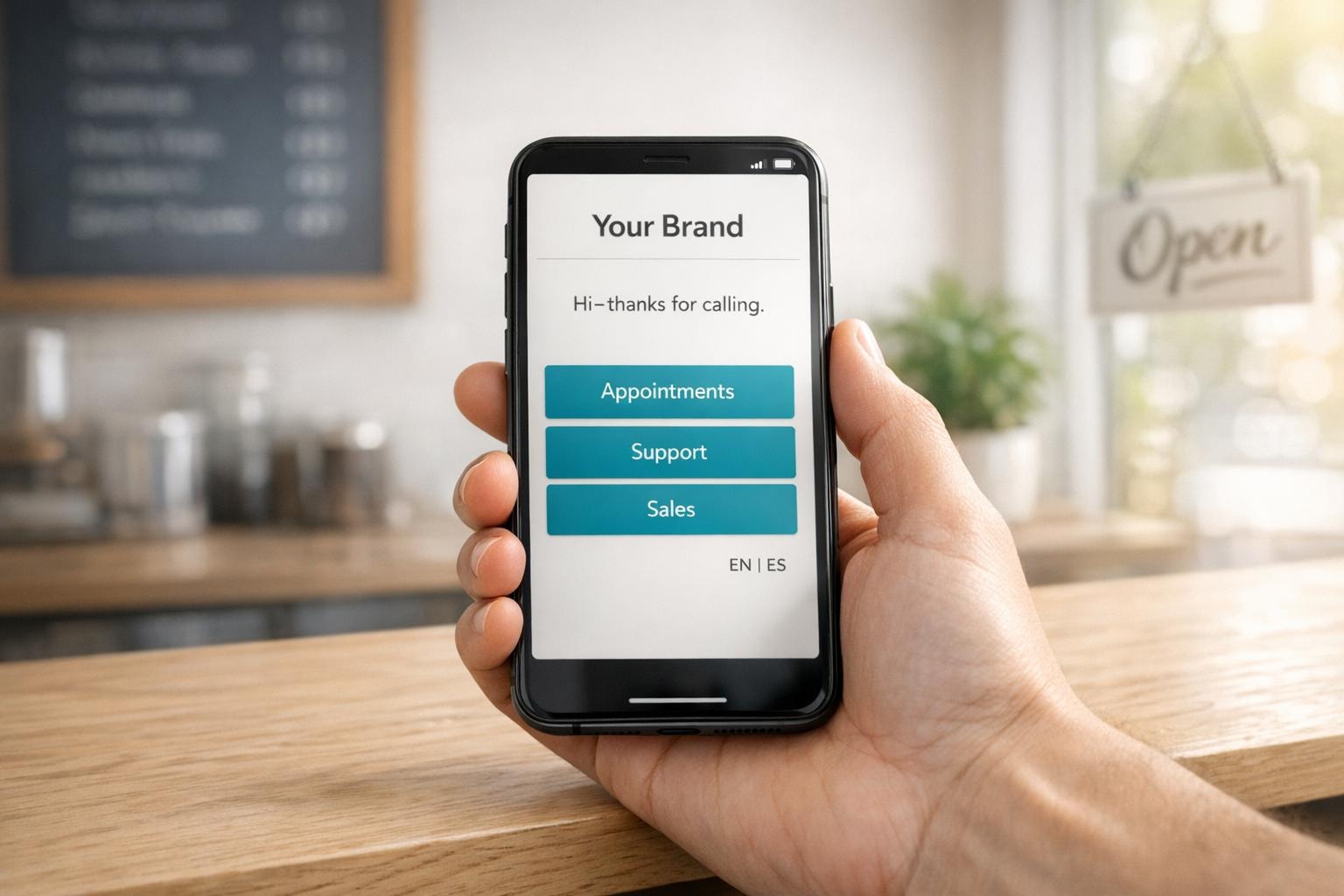
AI Phone Agents: Personalization Tips For SMBs
Cut phone costs by 90% while delivering personal service that keeps customers happy. Here's how to train your AI agent to sound human, not robotic.

Written by
Adam Stewart
Key Points
- Start with FAQs and appointments - save complex calls for later
- Train your AI to read caller emotions and adjust tone accordingly
- Use volume + impact + complexity to pick which calls to personalize
- Set clear handoff rules for sensitive calls to protect your reputation
When customers call your business, the first impression matters. A generic phone menu can frustrate callers, while a personalized AI phone agent can improve customer satisfaction and save time. For small and midsize businesses (SMBs), this is critical - every call counts.
Here’s how to follow best practices for AI phone agents:
- Prioritize Key Call Types: Focus on high-volume, impactful calls like FAQs, appointment booking, and after-hours support.
- Match Your Brand Voice: Set the agent’s tone to align with your business type (e.g., calm for healthcare, upbeat for sales).
- Train the AI: Teach it your business-specific terms, common customer phrases, and correct pronunciations.
- Design Smart Call Flows: Streamline customer interactions with clear routing rules and fallback options.
- Maintain Accuracy: Regularly update the AI’s knowledge base and review call performance to fix issues.
With platforms like Dialzara, you can set up an AI phone agent in minutes, cutting costs by up to 90% compared to hiring staff. Start small, focus on key improvements, and scale as needed to enhance customer experiences.
Choosing Which Call Types to Personalize First
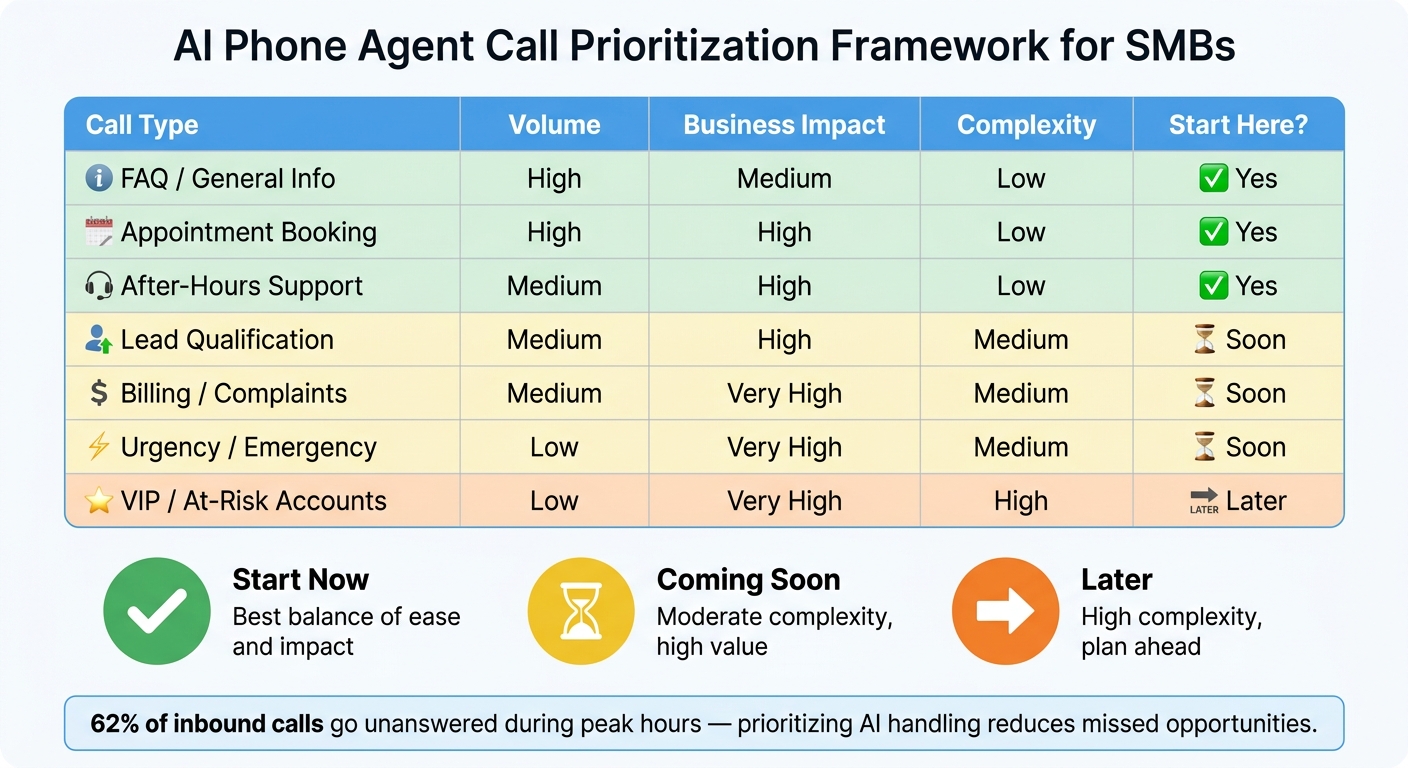
AI Phone Agent Call Prioritization Framework for SMBs
Not every call needs a tailored approach right out of the gate. Trying to personalize every call at once can create unnecessary complications and waste resources. Instead, focus on the call types where personalization can make a noticeable impact on your business. The key is to identify scenarios that deliver the most value when customized.
Identifying High-Value Call Scenarios
Certain call types are naturally better suited for personalization. For example, appointment booking and FAQ inquiries are excellent starting points. These calls tend to have high volumes and are relatively simple to adjust, meaning even small changes can lead to quick improvements. Similarly, after-hours support is another easy win - a thoughtful AI greeting after business hours can make the difference between a caller leaving a message or hanging up in frustration.
Beyond these straightforward cases, consider more nuanced scenarios. For instance, lead qualification calls can feel more engaging when agents reference a prospect’s previous interactions or align their tone with the caller’s communication style. This approach builds trust faster than sticking to a generic script. Likewise, billing or complaint calls benefit from a more empathetic, flexible tone, which can help diffuse tension and prevent the caller from escalating the issue unnecessarily.
Another way to maximize personalization is by addressing the caller’s emotional state. For example, if someone uses phrases like "urgent", "emergency", or "deadline", they likely need immediate assistance. Routing such calls through an expedited process - bypassing unnecessary steps - can improve the caller's experience and lead to faster resolutions.
Using a Simple Priority Framework
After identifying which call types to focus on, rank them based on three factors: volume (how frequently the call type occurs), business impact (how critical it is to get the interaction right), and personalization complexity (how difficult it is to implement changes).
Here’s a simple breakdown of common call types for small and medium-sized businesses, using these criteria:
| Call Type | Volume | Business Impact | Complexity | Start Here? |
|---|---|---|---|---|
| FAQ / General Info | High | Medium | Low | ✅ Yes |
| Appointment Booking | High | High | Low | ✅ Yes |
| After-Hours Support | Medium | High | Low | ✅ Yes |
| Lead Qualification | Medium | High | Medium | Soon |
| Billing / Complaints | Medium | Very High | Medium | Soon |
| Urgency / Emergency | Low | Very High | Medium | Soon |
| VIP / At-Risk Accounts | Low | Very High | High | Later |
Start with the top three rows - they offer the best balance of ease and impact. By prioritizing these areas, you can see measurable improvements early on without overwhelming your resources. Always remember, the goal of personalization is to improve key metrics - not to add complexity for its own sake. Focus your efforts where they’ll count the most.
sbb-itb-ef0082b
Defining Your Brand Voice and Agent Persona
Once you've decided which calls to personalize, the next step is ensuring your agent’s tone aligns with your brand. A tone that feels out of place - too formal for a friendly local shop or too casual for a law firm - can erode trust before the conversation even begins.
Creating a Voice That Matches Your Brand
Start by tailoring the agent’s accent, pace, and pitch to fit your industry and the type of caller. For example, a healthcare practice benefits from a calm and soothing tone, while a real estate office might aim for a confident and upbeat style. Sales calls often call for energy, while support interactions may require warmth and patience.
But it’s not just about setting a default tone. Your agent’s tone should adapt dynamically during the call. If a caller uses words like "frustrated", "wrong", or "urgent", the agent should instantly shift to a slower, more empathetic tone. On the flip side, if the caller gives short or clipped responses, a direct and professional tone might be more effective. This kind of responsiveness is what makes an AI agent feel natural rather than robotic.
It’s also essential to establish clear boundaries for your agent. Create a "do-not-say" list and set topic limits. For example, if a caller mentions "legal action" or "fraud", the agent should follow best practices for human handoffs and immediately transfer the call. This helps protect your brand and ensures sensitive issues are handled appropriately.
Once the voice is fine-tuned, the next step is to refine the agent’s persona to deliver a seamless customer experience.
Designing a Professional Phone Persona
The way your agent greets callers sets the tone for the entire interaction. Keep it short, clear, and aligned with your brand. A straightforward greeting like "Thanks for calling [Business Name], this is [Agent Name] - how can I assist you today?" works well. Long, drawn-out intros can frustrate callers and delay the reason for their call.
Similarly, the closing of the call is just as important. A consistent, professional sign-off - such as confirming next steps or thanking the caller by name - can leave a lasting impression. If your AI agent integrates with your CRM, it can take personalization even further by greeting return callers by name and referencing past interactions. This small touch can make the experience feel much more tailored.
According to Forrester’s 2026 CX predictions, voice AI is expected to handle 30–40% of routine interactions with over 90% customer satisfaction when configured correctly [1]. Achieving those results starts with crafting the right persona from the very beginning.
Training the Agent on Your Business Language
An agent’s effectiveness hinges on how well it understands your business-specific language. If it stumbles over service names or misinterprets customer requests, trust can erode quickly. That’s why thorough language training is critical - it ensures the personalized experience we touched on earlier remains intact.
Adding Industry Jargon and Local Terms
Once your agent’s persona is established, the next step is to teach it the precise terminology your business uses. Start by compiling a vocabulary list that includes all the products, services, packages, and appointment types your customers mention. Don’t just stick to official names - include the nicknames and shorthand terms that customers commonly use too. For instance, a dental office might focus on terms like "new patient exam", "emergency appointment", and "in-network insurance." Meanwhile, an HVAC company would need phrases like "AC tune-up", "repair visit", and "maintenance plan", along with the names of nearby cities or neighborhoods.
It’s also smart to pair each term with related synonyms. For example, "teeth cleaning", "dental cleaning", and "prophy" all refer to the same service. Your agent needs to recognize these variations to avoid confusion. According to a 2022 Capgemini report, 63% of customers lose trust in AI assistants that fail to understand common terms tied to a business’s offerings [2]. This highlights how critical it is to build a comprehensive vocabulary, especially for those early moments in a call when clarity matters most.
Don’t forget to update location-specific terms regularly. This ensures calls are routed correctly without mixing up service areas.
Correcting Pronunciation and Managing Unknown Terms
Mispronounced names or misunderstood terms can hurt your brand’s image. To avoid this, create a pronunciation review list that includes your business name, staff names, street addresses, and any specialized terms. Before launching your agent, test its pronunciation with your team. If needed, use override tools to correct any issues - written words don’t always translate perfectly to spoken language [3][4].
When the agent encounters a term it doesn’t recognize, guessing should never be an option. Instead, implement a fallback system. Start with a polite clarification prompt, such as, “Could you repeat that service name?” If the term remains unclear after a second attempt, the agent should escalate the call to a human representative. A 2023 Deloitte contact center survey revealed that nearly half of organizations using conversational AI identified vocabulary tuning as their top ongoing configuration challenge [2]. This makes it clear that language training isn’t a one-and-done task - it’s an ongoing effort to keep your AI agent sharp and dependable.
For SMBs using Dialzara, this process is built right into the setup. By regularly updating your agent with the latest industry terms, local expressions, and pronunciation guidelines, you can deliver a smoother customer experience and build stronger trust in your brand.
Up next, we’ll look at how to set up responsive call flows to further improve customer interactions.
Setting Up Call Flows and Routing Rules
Once your agent is equipped with the right language skills, the next step is ensuring calls flow smoothly. Personalized call routing not only enhances customer experience but also keeps interactions aligned with your business values.
Building Call Flows for Common Scenarios
A call flow outlines how each conversation unfolds. For most small and medium-sized businesses (SMBs), inbound calls generally fall into three categories: answering FAQs, scheduling appointments, and managing urgent requests.
- FAQ Calls: The agent should handle these using your knowledge base, resolving issues automatically.
- Appointment Booking: The agent confirms availability, gathers the caller's name and contact details, and sends a confirmation - all within the same call.
- Urgent Requests: These should bypass standard flows entirely, routing the caller straight to the on-call team.
Keep your call flows straightforward. If callers face more than two or three prompts before their issue is addressed, the process risks feeling like those outdated, frustrating phone menus everyone dreads. Simpler flows naturally improve routing and handoff efficiency.
Configuring Routing and Handoff Rules
Routing rules dictate how and when calls transition from AI to a human, ensuring a seamless customer experience. These rules are critical for avoiding frustrating phone interactions.
Time-of-day rules are a great place to start. During business hours, agents can attempt live transfers when a caller needs human help. After hours, the system should capture messages or schedule callbacks for the next business day. This is more important than many SMBs realize - 62% of inbound calls go unanswered during peak hours [5][7], and lead conversion rates can plummet by 80% if inquiries aren't addressed within the first hour [7].
Here are some common routing triggers:
| Routing Trigger | AI Handling | Human Intervention |
|---|---|---|
| Simple FAQ | Resolves using knowledge base | None |
| Lead Qualification | Asks budget/timeline questions | Transfers "hot lead" to a human |
| High Agitation | Detects sentiment using NLP | Escalates immediately to specialist |
| After-Hours Call | Captures message/schedules callback | Follows up next business day |
| Complex Complaint | Summarizes issue and transfers | Resolves with human judgment |
Always have a fallback plan. If a transfer fails, the agent should offer a callback or email follow-up [6]. A dead-end experience is just as damaging as a missed call.
During handoffs, ensure the agent provides a complete transcript and summary of the call. This eliminates the need for customers to repeat themselves, which can significantly enhance the perception of professionalism [5][8]. These small details go a long way in maintaining the personalized touch established earlier.
"The goal is not to replace your team. It's to handle the repetitive calls so your team can focus on the ones that matter." - Stephanie Powers, Editor, Content Marketing, Vida [6]
Dialzara makes it easy to configure call transfers and message relays right out of the box. These routing behaviors are part of the standard setup, not an extra feature. Once your flows are live, consider reviewing your transfer rates weekly. Ideally, 15% to 25% of calls should escalate to a human. If the rate is higher - around 30% to 40% - it may indicate the need for better routing rules or updates to your knowledge base [6].
Keeping Your AI Agent Accurate Over Time
To maintain meaningful engagement, your AI agent needs to stay up-to-date. This means regularly updating its information and behavior to reflect changes like new pricing, adjusted hours, updated policies, or seasonal schedules. Think of it this way: your AI agent should be updated as quickly as your website. A crucial part of this process involves keeping the knowledge base software accurate and relevant.
Keeping the Knowledge Base Current
Outdated content is often the root of incorrect answers. That’s why it’s essential to review your knowledge base on a monthly basis or whenever there are updates to business hours, pricing, services, or policies. Using an internal checklist can help - make "update the AI agent" as routine as "update the website."
Key areas to focus on include:
- Business hours, especially holiday or seasonal changes
- Service offerings and coverage areas
- Pricing details and active promotions
- Cancellation and no-show policies
- Staff roles and call-handling responsibilities
Platforms like Dialzara simplify this process by storing all this information in a centralized business profile. This setup allows you to make updates without having to rebuild anything from scratch. Using structured templates for common updates - like adding a "new service" entry with details such as its name, price range, and booking instructions - also helps maintain consistent responses and minimizes contradictions.
But keeping content current is only part of the equation. Regularly evaluating how your AI agent performs during calls is just as critical.
Reviewing and Improving Call Behavior
Analyzing call transcripts is a practical way to gauge your AI agent's performance. Set aside time each week to review a random sample of 10–20 calls, along with any that resulted in escalations, negative feedback, or unusually long durations. This process typically takes 30–60 minutes and can reveal issues that raw metrics might miss.
When reviewing calls, focus on identifying two types of problems: knowledge gaps and behavior or routing issues. Knowledge gaps occur when the agent provides incorrect information due to outdated content - like old pricing or incorrect hours. On the other hand, behavior or routing issues arise when the agent has the correct information but delivers it in a confusing way or transfers calls to the wrong team.
Addressing the right issue is key. For example, updating a FAQ won’t fix a routing error, and fixing routing won’t help if the underlying information is wrong. Once you identify a recurring issue, resolve it at its source and test the fix before moving on. This "identify, fix, and verify" loop ensures your AI agent stays accurate without the need for a complete overhaul.
To keep everything running smoothly, assign clear responsibilities. For instance, an operations manager can handle quarterly deep audits, while a front-desk lead reviews and flags issues weekly. This proactive approach prevents problems from piling up and ensures maintenance happens regularly, rather than waiting for a customer complaint to force action.
Conclusion: Getting More from Your AI Phone Agent
Your AI phone agent isn't just a tool - it's an opportunity to stand out in a competitive market. McKinsey reports that 71% of consumers expect personalized interactions, and a frustrating 76% feel disappointed when they don't receive them [9]. For small and medium-sized businesses, that frustration often translates into losing customers.
So, how do you make your AI agent perform at its best? It boils down to five key practices: start with your most valuable call types, create a consistent brand voice, train the agent with language specific to your business, design intelligent call flows and routing rules, and keep the knowledge base updated. Here's the good news: you don't need technical skills or a big team to make this happen. With just an hour of focused setup, you can have a strong foundation. From there, improvements come in small, manageable steps.
And the payoff is worth it. Deloitte found that businesses using AI-driven service tools saw a 20–40% drop in call, chat, and email volumes, giving their teams more time to handle tasks that require human attention [10]. Over time, this efficiency adds up, delivering long-term benefits with minimal effort.
Ready to get started? Dialzara makes implementation seamless. Sign up, answer a few simple questions about your business, pick a voice and phone number, and set up call forwarding. In just minutes, your AI agent is live. It works 24/7, integrates with over 5,000 business tools, and can save up to 90% compared to traditional staffing. Whether you're in healthcare, real estate, law, or another industry, Dialzara ensures your AI agent feels like a natural part of your team.
Focus on two or three key call types to start, get the basics right, and grow from there. Simple, consistent efforts lead to lasting success.
FAQs
Which call types should I automate first?
Start by automating repetitive, high-volume calls that don’t need much human involvement. These include handling FAQs and general inquiries, which can save money and improve efficiency. Another smart move is automating appointment booking calls - these are simple tasks that ensure no opportunities slip through the cracks. By doing this, your team can focus on resolving more complex issues, while routine customer interactions are handled seamlessly around the clock.
How do I make the agent sound like my brand?
The first step in aligning AI with your brand is defining your brand's personality - this includes tone, style, and core values. Once you’ve nailed that down, select an AI voice that mirrors these traits. Consider aspects like tone, pacing, gender, and accent to ensure it resonates with your audience.
To make the AI truly reflect your brand, train it using scripts, industry-specific terms, and customer interaction history. This helps create a consistent and authentic representation of your brand in every interaction.
Don’t stop there - regularly gather feedback from users and refine the AI’s responses. This ongoing process ensures the AI stays aligned with your brand’s identity while fostering trust and credibility with your customers.
When should the AI transfer to a human?
AI phone agents should pass the call to a human when a customer's question is too complicated, needs a more personalized touch, or goes beyond what the AI can handle. Having clear protocols for these handoffs is crucial, especially for delicate matters or when the customer specifically asks to speak with a person. Equipping the AI with comprehensive knowledge and setting clear transfer rules helps maintain a balance between efficiency and top-notch customer care.
Summarize with AI
Related Posts
How AI Voice Agents Learn Customer Preferences
AI voice agents enhance customer service by learning preferences and adapting responses, ensuring effective communication and optimized support.
How AI Prioritizes Customer Calls
AI enhances call management for businesses by prioritizing urgent calls and reducing wait times, improving customer service and operational efficiency.
Personalized AI Calls: Setup Guide for SMBs
Learn how personalized AI phone agents can enhance customer service for SMBs, providing 24/7 support while cutting costs and improving satisfaction.
How AI Phone Agents Improve Customer Engagement
AI phone agents revolutionize customer service by delivering 24/7 support, cutting costs, and enhancing customer satisfaction through personalized interactions.