

Step-by-Step Guide to AI Travel Chatbot Setup
Build a 24/7 travel assistant in under 10 minutes and stop losing 30-40% of bookings to slow response times.

Written by
Adam Stewart
Key Points
- Set up automated responses for 70% of routine travel queries
- Format pricing in USD and temperatures in Fahrenheit for US customers
- Reduce customer service costs by 30% with AI automation
- Connect your booking system for instant availability checks
Want to set up a travel chatbot that works 24/7 for customer service, saves costs, and improves customer experience? This guide explains how to create an AI-powered travel assistant using Dialzara. Here's what you'll learn:
- Why AI chatbots matter: 30-40% of bookings are lost due to slow responses. Automating 70% of routine queries can cut service costs by 30%.
- What you'll need: A Dialzara account, access to tools like OpenAI or Amadeus, and US-specific travel data formatted in USD, Fahrenheit, and miles.
- Step-by-step process: From account creation to integrating booking tools, training your bot, and launching it for real-time use.
- Key benefits: Faster response times (<30 seconds), reduced workload for staff, and higher booking conversions.
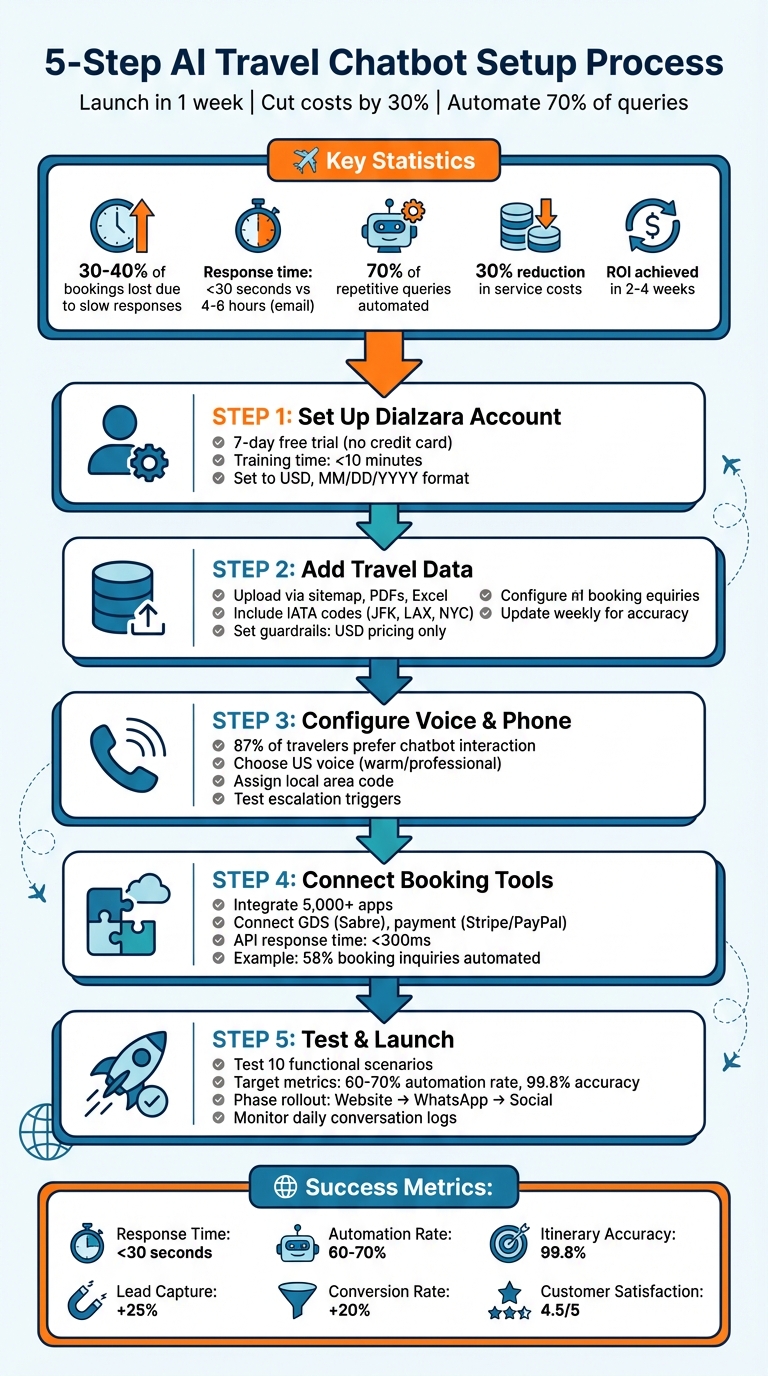
5-Step AI Travel Chatbot Setup Process with Key Metrics
What You Need Before Starting
Required Tools and Accounts
To set up your AI agent, you'll need a Dialzara account to host and manage voice-enabled interactions. Additionally, you'll require access to an LLM provider like OpenAI API or Azure OpenAI Service [5][6]. For real-time travel data, secure access to Amadeus for Developers, which provides information from airlines, hotels, and transfer services [5].
You'll also need a payment processing account, such as Braintree [7], and a Node.js development environment paired with Visual Studio Code and the Amadeus Node SDK [5]. Integration tools like Make.com or Zapier are necessary for automating workflows [3]. If you plan to include SMS functionality, consider setting up a Twilio account [11].
Once these tools are ready, focus on collecting travel-specific data tailored to the US market.
Preparing US-Specific Data
To cater to a US audience, format your travel data appropriately. Convert prices to USD ($), distances to miles, and temperatures to Fahrenheit (°F). Ensure phone numbers follow the (XXX) XXX-XXXX format [9].
Start by gathering essential travel information, such as tour packages, cancellation policies, group booking rules, and FAQs. Add detailed destination information, including local attractions, sample itineraries, and other relevant details [3][8]. Operational data, like advisor expertise, service fees, and visa requirements, should also be included [10].
To streamline the process, use your website’s sitemap (commonly located at /page-sitemap.xml) to bulk-upload content into your chatbot’s knowledge base [3]. Additionally, include IATA codes for airports and metropolitan areas (e.g., JFK, LAX, NYC) to ensure your AI can accurately interpret travel origins and destinations in API calls [5].
For security, store sensitive information - like API keys - in a .env file. Properly formatted and secure data ensures that your AI agent can process travel information smoothly and efficiently.
sbb-itb-ef0082b
Step 1: Set Up Your Dialzara Account
Creating Your Account
Head over to https://dialzara.com and hit the "Sign Up" button to get started. Dialzara offers a 7-day free trial - no credit card needed. Just enter your email address, set a password, and provide some basic details like your business name (e.g., "Sunset Travel Agency"), a US phone number in the +1 format (e.g., +1-555-123-4567), and your business address with the correct zip code.
You'll also need to add your business website URL. This allows Dialzara to automatically pull service details for you. Make sure to set your currency to USD ($) and the date format to MM/DD/YYYY to align with US standards. The entire signup process takes just a few minutes, and once you're done, verify your email to activate your account.
Training Your AI Agent
After logging in, you'll be prompted to complete a quick setup questionnaire about your travel business. Choose "Travel" as your industry and describe the services you offer - like flight bookings, hotel reservations, or vacation packages. Dialzara uses this info to create a tailored AI prompt for your business.
Next, upload any existing resources like travel FAQs, booking scripts, or call recordings using the "Add Knowledge" feature. You can even paste your website’s sitemap URL to quickly import content like destination guides and package details into the system. Don’t forget to teach the AI common US travel terms like "red-eye flight", "layover", and "blackout dates" to ensure it speaks your customers' language.
Set your AI's communication style to casual and upbeat US English. For instance, phrases like "Hey there, ready to book that dream vacation to Miami?" can make interactions feel more personal and engaging by using AI tools for personalized customer service. This friendly tone has been shown to boost booking conversions by as much as 30%. Best of all, the AI training process is fast - it’s done in under 10 minutes.
Once your account is set up and your AI agent is trained, you're ready to move on to the next step: adding travel-specific details.
Step 2: Add Travel-Specific Information
Uploading Travel Data
Start by uploading your travel data through options like a sitemap URL, PDFs, Excel files, or connected cloud storage platforms such as Google Drive or Notion. Using the sitemap method lets you import all your destination guides, tour packages, and pricing details in one go, saving time and effort [3][4].
When organizing your data, include essential details like destinations, itineraries, and terms commonly used in the US travel industry - think "red-eye flight", "layover", "all-inclusive", and "blackout dates." This ensures the AI communicates in a way that feels natural to your audience. Set clear guardrails in your prompts, such as: "Only recommend our company's services", "Use USD for all pricing", and "If you don't know something, say so instead of guessing" [3]. These instructions help the AI avoid providing incorrect answers or mentioning competitors.
To enhance customer experience, consider using the Carousel feature. This allows you to display destination options with images rather than long text blocks, making the browsing process more engaging and user-friendly [3].
Once your travel data is well-organized and guardrails are in place, you're ready to focus on keeping your system operational around the clock.
Setting Up 24/7 Operation
With your travel information integrated, enabling 24/7 availability is crucial to meet customer needs across all time zones. Studies show that 30-40% of travel bookings are lost due to slow response times, making this step essential [1]. Be sure to configure time zone handling for EST, CST, MST, and PST, ensuring customers across the US receive accurate information about business hours and availability.
Train your AI to handle the most frequent customer inquiries, which typically include:
- Flight and hotel bookings (40% of queries)
- Pricing information (25%)
- Booking status updates (20%) [1]
For more complex issues - like visa problems or missed connections - set up escalation triggers to human agents to immediately route these cases to on-call staff. For example, KLM Royal Dutch Airlines reduced their wait times from 15 minutes to just 2 minutes by using an AI chatbot to manage up to 10,000 daily conversations, leaving human agents free to handle urgent matters [9].
To keep everything running smoothly, update your flight schedules, hotel rates, and travel policies at least once a week. This ensures customers always receive the most accurate and up-to-date information [4].
Step 3: Set Up Voice and Phone Features
With your travel data ready and round-the-clock operation in place, it's time to improve how customers interact with your business by adding voice and phone features.
Choosing a US Voice
The voice you select for your AI agent plays a big role in shaping how customers view your travel business. Dialzara's AI voice technology offers natural-sounding options that help establish trust quickly. Think about your brand's personality and audience when choosing a voice. For instance, a warm, friendly tone works great for family vacation packages, while a polished, professional voice is better suited for corporate travel services.
You can also adjust the voice's speed, pitch, and tone to match your audience. If your clients are retirees booking cruises, a slower pace with clear enunciation can make communication easier. Interestingly, 87% of travelers prefer interacting with a chatbot over a human agent [12] - but only if the voice feels natural and easy to understand. To make sure your chosen voice works well, test it with common travel terms like "red-eye flight", "TSA PreCheck", and "all-inclusive resort" to confirm it handles industry-specific language smoothly.
Once you're happy with the voice, it's time to set up a dedicated US phone number.
Setting Up Your Phone Number
You can assign a US phone number directly through the Dialzara dashboard. Picking a local area code that aligns with your business location or target market can make customers more likely to answer your calls. Configure the number to handle common inquiries, such as flight availability, pricing, and booking confirmations, through call forwarding.
To streamline operations, set up your system as a smart router. Let the AI handle routine questions, while more complex issues - like visa problems or missed flights - are escalated to your human team. Test your phone setup on different devices to ensure clear audio and stable connections. Also, try interrupting the greeting with commands like "hello" or "operator" to confirm that escalation triggers work as expected [14][15].
Step 4: Connect Booking Tools and Apps
Once your voice and phone features are ready, it’s time to link your travel booking tools. Dialzara offers integration with over 5,000 business apps, letting you connect systems like payment processors and flight inventory platforms with ease.
Integrating Apps and APIs
A reliable travel chatbot relies on secure API connections. Start by mapping out your tech stack, listing all third-party platforms you use - like GDS systems such as Sabre or payment gateways like Stripe and PayPal for USD transactions [19]. For airlines and major travel agencies, GDS integration simplifies the customer experience, enabling users to book flights, hotels, and car rentals all within a single conversation [13][19].
These integrations aren’t just about convenience; they’re built to handle high demand. For example, Lufthansa Group managed 16 million conversations in 2025/2026, even handling peaks of 375,000 daily interactions during disruptions [19]. Virgin Australia also broke new ground by adopting Sabre’s Concierge IQ, allowing travelers to complete bookings entirely through chat [13].
"This GenAI chat channel is an important step forward for Virgin Australia's next wave of digital shopping, booking and servicing experiences." - Alex Plummer, General Manager, Digital, Virgin Australia [13]
For real-time hotel availability, secure API connections to booking engines ensure accurate inventory updates [17][18]. If you’re working with older systems that lack APIs, consider using web-navigating bots to automate tasks like completing bookings on third-party sites [16]. These connections provide instant, accurate booking details while streamlining payment and transaction processes.
Once your integrations are in place, you can configure your AI system to handle specific booking tasks with precision.
Setting Up Chatbot Actions
Define function parameters to enable actions like booking confirmations, payment processing, and routing complex queries to human agents. You can also set up event triggers to automate follow-ups, such as sending confirmation messages after a successful Calendly booking [5][20][21]. For instance, a getFlights function can use parameters like IATA airport codes, travel dates, and passenger numbers to retrieve flight options from your database [5].
It’s essential to establish human handoff protocols for complex or sensitive queries. These protocols should ensure that your team receives the full conversation context when stepping in [16][19]. FlyAway, for example, saw a 35% drop in call center volume and a 28% boost in ancillary sales by configuring intelligent actions that handled 58% of booking inquiries and 72% of flight change requests in 2025 [22].
Focus first on automating high-volume, straightforward tasks, such as identity verification or answering FAQs, before tackling more intricate workflows like complete booking automation [19]. This phased approach minimizes risk while you refine your system. With 63% of travelers now favoring messaging over phone calls for booking help, these automated actions are key to meeting customer expectations [22].
Step 5: Test and Launch Your Chatbot
Once your integrations are set up, the next step is to put your AI agent through its paces with real-world travel scenarios. This testing phase ensures your chatbot isn’t just functional - it’s ready to meet customer expectations.
Testing with US Travel Scenarios
Divide testing into two main categories: functional testing for standard inquiries and edge case testing for more complex situations [1]. For functional testing, run 10 scenarios involving destination searches, price estimates, and booking lookups using actual reference codes [1]. Simulate real-life US-based travel requests like, “Change my flight to later, but keep my hotel reservation,” to confirm the reliability of API integrations and payment processing [7].
Expand testing further by addressing more intricate scenarios, such as multi-destination itineraries, large group bookings, and specific customer needs like wheelchair access or dietary restrictions [1]. Set up triggers for urgent situations - keywords like “flight canceled,” “medical emergency,” or “lost documents” should immediately escalate to a human agent [1]. Key performance benchmarks to monitor include:
- Response time: Under 30 seconds
- Automation rate: 60–70%
- Itinerary accuracy: 99.8%
- API response time: Under 300ms [1][7]
| Success Metric | Target Goal |
|---|---|
| Response Time | < 30 seconds |
| Automation Rate | 60–70% |
| Itinerary Accuracy | 99.8% |
| API Response Time | < 300ms |
Take a phased approach to your chatbot’s rollout. Start with your website’s chat widget, then gradually expand to platforms like WhatsApp, Facebook Messenger, and Instagram Direct over the following weeks [1]. This method allows you to closely monitor performance and make necessary adjustments before scaling further. Once testing is complete, shift to continuous tracking to fine-tune your chatbot over time.
Tracking and Improving Performance
After launch, it’s crucial to monitor live interactions and refine your chatbot based on real-time data. Review daily conversation logs to identify where the chatbot struggles or fails to provide accurate responses [1]. Use tools like the Dialzara dashboard to analyze visitor behavior and uncover knowledge gaps. Focus on improving key metrics such as:
- Lead capture rate: Aim for a 25% increase
- Conversion rate improvement: Target a +20% boost
- Customer satisfaction scores: Maintain at least 4.5 out of 5 [1]
"Chatbots now resolve up to 70% of repetitive travel inquiries, enabling human agents to focus on complex issues." [2]
Keep an eye on API response times, ensuring they stay below 300ms to maintain smooth and natural conversations [7]. Update your chatbot’s training data weekly, using insights from failed queries to improve its handling of US-specific travel scenarios.
Finally, measure your ROI by calculating the time saved from automated inquiries (multiplied by minutes saved per inquiry) and recovered inquiries (factoring in conversion rates and average order values). Subtract your monthly operating costs to get a clear picture of your chatbot’s financial impact [1]. With 61% of travelers preferring chatbots for flight-related queries over traditional phone calls, optimizing performance can directly boost your business’s bottom line [2].
Fixing Common Problems
Troubleshooting is an essential part of setting up your AI chatbot for a travel booking system. The most frequent issues typically fall into two areas: formatting errors that confuse US-based travelers and integration failures that disrupt connections with booking systems. Here’s how to tackle them.
Fixing Formatting Issues
US travelers expect specific formats: dates should appear as MM/DD/YYYY, prices in USD with the dollar sign ($), and temperatures in Fahrenheit. If your chatbot displays dates in DD/MM/YYYY or prices in euros, it creates unnecessary confusion. To fix this, update your system prompt to enforce US formatting standards: "Always display dates as MM/DD/YYYY, show all prices in USD, and use °F for temperatures" [3][29].
Platforms like Dialogflow include system entities that can automatically interpret phrases like "next Monday" or "June 21st" and convert them into the correct format [28]. For industry-specific details - like room categories ("king suite") or car types ("full-size SUV") - you can create custom entities to ensure your chatbot accurately processes customer requests [28]. Before going live, use simulation tools provided by your platform to test conversations and confirm that dates, prices, and other key details populate correctly [29].
To avoid misinformation, include a safeguard in your prompt: "If you don't know something, say so instead of making it up" [3]. Once formatting issues are resolved, you can move on to addressing integration challenges.
Solving Integration Problems
When your chatbot struggles to connect with booking systems, the issue often lies with API compatibility or data silos. Most modern travel platforms rely on REST APIs, but older systems may still use SOAP (XML-based) protocols [24]. Start by reviewing your booking tool's API documentation to understand rate limits, authentication requirements, and supported features [24].
Another common problem arises when the chatbot operates in isolation, failing to sync with booking platforms or help desks. This results in disconnected data that agents must later correct manually [23]. To avoid this, link your chatbot to real-time systems like Amadeus, Sabre, or Galileo for up-to-date flight schedules instead of relying on outdated static data [1][4]. Middleware tools like Zapier or Make.com can simplify integration with US business tools like Salesforce or Google Sheets, eliminating the need for custom code [27].
"Each minute of downtime at Fortune 500 companies can cost between $5,600 and $540,000 depending on the industry." – Gartner [25]
Before launching, simulate past booking scenarios to identify connection errors and gaps in the chatbot's knowledge [23]. Use data validation to prevent the bot from confirming bookings that don’t exist [26]. For complex actions, such as final payments or rebookings, ensure the chatbot can escalate to a human agent, providing them with the full chat history to streamline the process [23][26]. Regularly test your APIs for security vulnerabilities to protect both your business and customer data [24].
Conclusion
By following these five steps, you can have an AI travel chatbot up and running in as little as one week [1]. Start by addressing high-volume queries, like destination details and flight searches, and then refine and expand based on real customer interactions.
The financial upside is hard to ignore. AI chatbots can cut operational costs by up to 40% and handle 70% of repetitive tasks [1][22]. This frees up your team to focus on high-value bookings instead of routine inquiries. Plus, with response times under 30 seconds - compared to the 4–6 hours typical for email [1] - you can recover as much as 40% of lost bookings.
Dialzara runs 24/7 and integrates seamlessly with your existing systems. For agencies managing 30 or more daily inquiries, the return on investment often comes within 2 to 4 weeks of deployment [1].
Industry leaders emphasize the value of chatbots in travel services:
"Chatbots now resolve up to 70% of repetitive travel inquiries, enabling human agents to focus on complex issues." – Salesforce [2]
With 63% of travelers favoring messaging over phone calls for booking assistance [22], adopting Dialzara can transform your customer service. Meet the demand for faster, more convenient booking experiences today.
FAQs
How can I stop the chatbot from giving wrong answers?
To reduce errors, start by training the chatbot with well-organized, high-quality data from reliable sources like support tickets and internal documentation. This ensures the bot has a strong foundation of relevant information. Next, define user intents and key entities clearly - this step helps the bot understand what users are asking and identify critical details.
Regularly refining the NLP model is crucial. Incorporating context and memory allows the chatbot to handle multi-turn conversations more effectively, making interactions feel smoother and more natural. Before deployment, test the chatbot in real-world scenarios to identify any gaps or issues. Once live, monitor its performance closely and make continuous adjustments to improve its accuracy and reliability.
What data should I upload first for US travelers?
To get started, upload data tied to common travel-related questions - things like bookings, destinations, travel dates, and locations. Focus on pulling information from sources like customer support tickets, online reviews, and social media conversations. These are goldmines for understanding traveler concerns and preferences.
Next, categorize user intents into groups such as flight bookings, hotel reservations, or cancellations. Make sure to extract essential details like city names, travel dates, and any relevant personal information. This ensures the chatbot can smoothly handle the typical requests that US travelers might have.
When should the bot hand off to a human agent?
When a bot encounters its limits or faces a request that demands human expertise, it’s essential to transition the conversation to a human agent. According to Dialzara's deployment guide, incorporating human-in-the-loop steps is crucial for addressing exceptions or more intricate issues. This approach not only ensures that customer concerns are properly resolved but also helps maintain a high level of customer satisfaction.
Summarize with AI
Related Posts
Best AI Travel Assistants for Hospitality Businesses
Explore how AI travel assistants are revolutionizing the hospitality industry by enhancing customer service and streamlining operations.
How Travel Chatbots Improve Booking Support
Explore how AI-driven travel chatbots enhance booking support, offering personalized assistance, real-time updates, and cost savings for companies.
AI-Powered Instant Response: Setup Guide 2024
Set up an AI-powered instant response system with this comprehensive guide covering key benefits, requirements, steps, troubleshooting, and maintenance.
Best Practices for Deploying Voice AI
Learn effective strategies for deploying Voice AI in SMBs to enhance customer service while reducing costs and improving efficiency.