
Step-by-Step Guide to AI Call Agent Setup
Set up your AI call agent in 15 minutes and cut customer service costs from $2,800 monthly to under $50.

Written by
Adam Stewart
Key Points
- Complete setup takes just 15 minutes with proper planning
- Cut costs from $2,800+ monthly to under $50 with AI agents
- Capture 28.5% of calls that happen after business hours
- Stop losing customers - 85% won't call back after no answer
Missed calls hurt businesses. Did you know that 62% of small businesses lose customers due to unanswered calls? AI call agents solve this problem by handling calls 24/7, providing consistent responses, scheduling appointments, and routing inquiries - all for less than $50 a month compared to a $2,800+ human receptionist.
Key Takeaways:
- What They Do: AI call agents use Speech-to-Text (STT), Large Language Models (LLM), and Text-to-Speech (TTS) to engage callers in a natural, human-like manner.
- Who Benefits: Perfect for industries like legal, healthcare, home services, and real estate - any business that deals with high call volumes or after-hours inquiries.
- Setup is Simple: Identify your call needs, train the AI using your FAQs, connect tools like calendars and CRMs, and go live in 15 minutes.
Why It Matters: 28.5% of calls happen after hours, and 85% of callers won’t try again. An AI call agent ensures every call is answered, improving customer experience and saving money.
Want to learn how to set one up? Let’s dive in.
Planning Your AI Call Agent Setup
Skipping the planning phase can lead to an AI agent that frustrates callers instead of helping them. A little preparation upfront can save you from headaches and costly rework later.
Assess Your Business Needs
Start by evaluating your current call patterns. Look at call volume, peak times, and the types of inquiries you typically handle. When do most calls come in? What are the most common questions your callers ask? These insights are key to shaping your strategy.
If you're not tracking these metrics yet, consider this: just one missed call can cost your business over $1,200 [5]. Understanding when and why people call will help you identify where an AI agent can make the biggest difference.
Once you've gathered this data, outline the specific situations your AI agent will handle.
Define Your Key Call Scenarios
Using your call data as a foundation, map out the tasks your AI agent will manage. Think of the daily responsibilities of a receptionist - these are a good starting point.
Typical call flows might include booking appointments, answering pricing questions, transferring calls to the right team member, and handling after-hours inquiries. Beyond these basics, establish clear guidelines for when a human should take over. For example, callers requesting a live person, disputes over billing, or particularly complex issues should trigger a transfer. For service-focused businesses like HVAC or plumbing, flag emergency keywords like "flooding" or "no heat" to ensure immediate escalation to on-call staff [3].
To make your agent more effective, build a solid FAQ database. Aim for 10 to 20 entries covering essentials like pricing, service areas, and policies. This can help your agent handle a wide range of questions without hitting a dead end [3].
Once you've defined these scenarios, gather the tools and resources your agent will need.
Gather Your Technical and Operational Resources
Equip your AI agent with everything it needs to succeed [5]:
- Your business website and FAQ pages: These provide the agent with essential information about your services, hours, and common questions.
- A scheduling tool (like Google Calendar): For seamless appointment booking.
- Your CRM or contact system: Ensures caller details are captured and integrated into your existing workflows.
- A list of team members and their roles: Helps the agent transfer calls accurately.
- Your current phone number: Most carriers let you set up rules like "forward when busy" or "forward when unanswered", so you can keep using your existing number [3].
Finally, draft a concise greeting script - keep it under 15 seconds to maintain caller engagement. Follow best practices for AI voice branding early on to ensure your AI agent feels like a natural part of your business.
sbb-itb-ef0082b
How to Set Up Your AI Call Agent: Step by Step
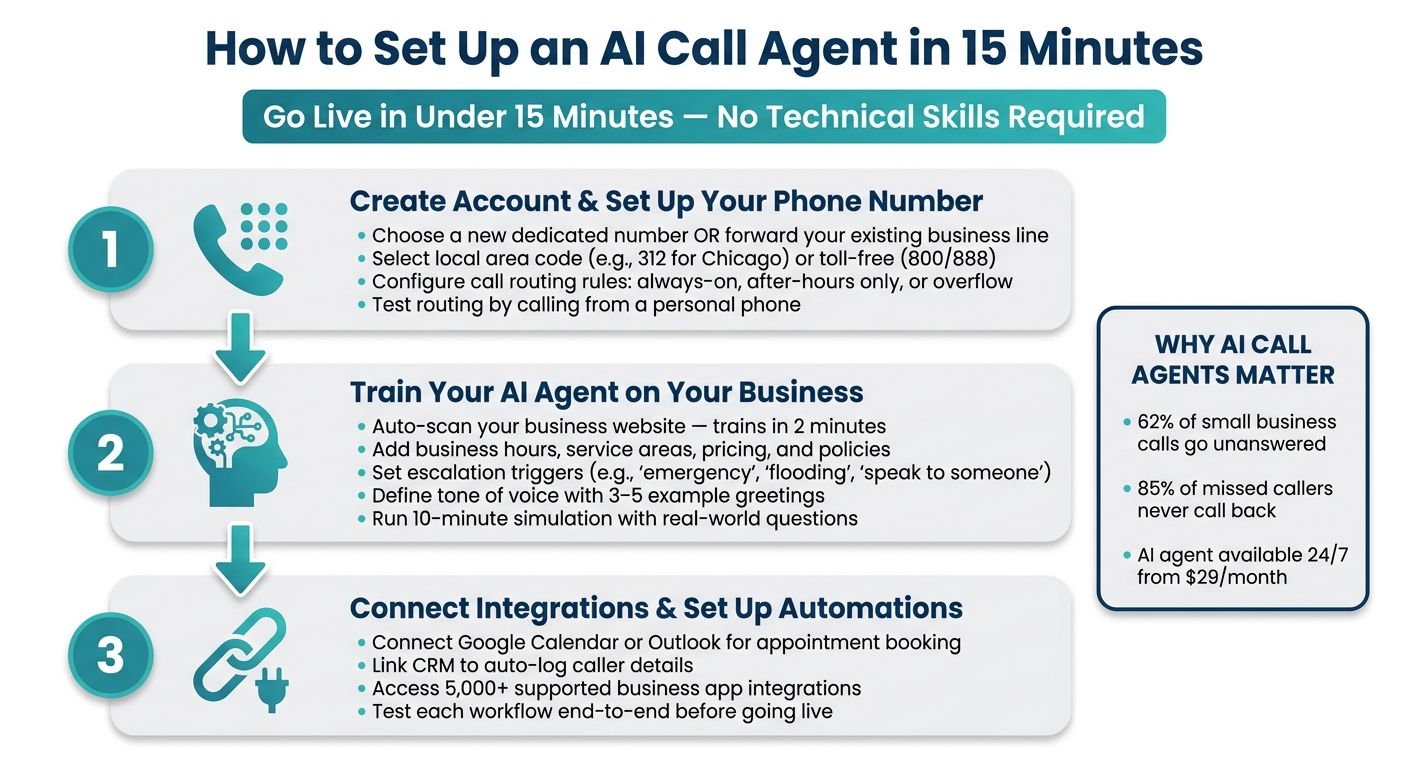
How to Set Up an AI Call Agent in 15 Minutes
With your call scenarios and resources ready, you can have your agent up and running in under 15 minutes using Dialzara.
Create an Account and Set Up Your Phone Number
First, sign up and complete your account setup. Once you're in, you'll need to choose a phone number for your AI agent. You have two choices: either get a new dedicated number through the platform or forward your existing business line. Forwarding your current number ensures seamless caller recognition.
If you decide on a new number, select an area code that aligns with your primary market. For instance, a local area code like 312 (Chicago) or 404 (Atlanta) often leads to higher answer rates since customers recognize it. On the other hand, if you serve customers across the country, a toll-free number (e.g., 800 or 888) can convey a sense of nationwide reach and professionalism.
Next, configure your call routing rules. Decide whether the AI should answer every call immediately, pick up after a specific number of rings, or only step in when your team is unavailable. For after-hours coverage, set the AI to handle all calls outside of your business hours using a tailored script. For overflow situations, route calls to the AI only when your staff is busy. Be sure to test the call routing by calling from your personal phone to confirm everything works smoothly.
Train Your AI Agent on Your Business
Once your phone number is ready, it’s time to customize your AI agent’s responses. Most platforms begin by scanning your business website. This step alone can train the agent on your core services, FAQs, and general operations in just 2 minutes [5]. After that, you’ll need to provide additional details not found on your site.
Share critical information like your business hours (in your local time zone), service areas, pricing ranges, and policies that are frequently asked about. Don’t forget to include escalation triggers - specific phrases like "emergency", "flooding", or "I need to speak to someone now" should prompt the AI to transfer the call immediately instead of delivering a scripted reply. You’ll also want to define your tone of voice. Whether your brand is more formal or casual, provide 3–5 example greetings to ensure the agent reflects your company’s personality.
After the initial setup, spend about 10 minutes simulating real calls. Ask the AI your most common questions, throw in a few curveballs, and listen for any awkward responses or errors. Fine-tune the settings until the responses sound natural and align with your expectations.
Connect Integrations and Set Up Automations
With your agent trained, the next step is to integrate it with your essential business tools. Start by connecting your calendar (like Google Calendar or Outlook) so the agent can book appointments based on your actual availability - no more back-and-forth scheduling. Then, link your CRM to automatically log caller details.
Dialzara supports integrations with over 5,000 business applications, allowing you to connect your existing tools without overhauling your workflow. After setting up these integrations, test each workflow from start to finish. This includes verifying that appointments, inquiries, and transfers are handled correctly. Catching and fixing any issues during testing is much easier than dealing with them during live customer interactions.
Testing and Improving Your AI Call Agent
Once you've set up your AI agent and connected all integrations, the next step is critical: testing and fine-tuning. Before going live, take the time to ensure everything runs smoothly.
Run Internal Test Calls
Start by calling your AI agent yourself. Input your mobile number to receive a test call and evaluate both the voice quality and response speed [1]. During web-based test calls, use the Live Transcript feature to observe how the agent processes your words and selects responses in real time [1].
After each call, review the recording and transcript to identify any missteps, such as the agent misunderstanding your intent or providing incorrect answers. Double-check that all post-call automations are functioning properly - did the CRM update as expected? Did the email summary arrive? [1] If something isn’t working, update the instructions and test again right away [2].
Push the boundaries by intentionally steering the conversation off-topic or attempting to trigger behavior the agent is programmed to avoid. If it handles these situations effectively, that’s a strong indicator you’re on the right track [2].
Once your test calls are polished, shift your attention to tracking real-world performance metrics.
Track Key Performance Metrics
When live calls begin, a few key metrics will help you gauge how well the agent is performing. Monitoring these numbers allows you to make quick, informed adjustments.
| Metric | Target | Adjust if Metrics Deviate |
|---|---|---|
| Transfer Rate | Under 20% | Expand the knowledge base with more FAQs and business details [3] |
| Greeting Length | 10–15 seconds | Shorten the intro if callers hang up early [3] |
| Booking Rate | Varies by industry | Refine scheduling logic or adjust calendar buffer times [3] |
| After-Hours Call Capture | 100% of calls | Check call forwarding rules and emergency triggers [3] |
For example, if the transfer rate exceeds 20%, it’s a clear signal the agent requires additional training tailored to your business [3]. Post-call summaries and transcripts make it easy to audit performance without the need to listen to every recording [1].
Refine Based on Results
Initial refinements are essential to ensure the agent meets your business requirements. Many businesses make 2–3 adjustments during the first week of live operation [4]. Review transcripts from the first few days to identify missed questions and add those answers to the knowledge base [3][4].
If callers frequently request to speak to a person, confirm that escape phrases like "I want to speak to a person" are configured to trigger immediate call transfers [4]. Also, don’t forget to test the agent during after-hours to verify emergency routing is functional. This step is often overlooked but is crucial for capturing important calls outside of regular business hours [3].
Conclusion and Next Steps
Key Takeaways
Now that testing is complete, let’s recap the journey and look at what’s next.
Setting up an AI call agent is simpler than you might think. You’ve tackled all the essential steps: identifying your needs, training the agent, integrating it with your systems, and fine-tuning based on real-world call data.
Here’s a reminder of why this matters: 62% of calls to small businesses go unanswered [5], and 85% of those callers won’t try again [5]. An AI call agent, available 24/7, solves both issues in one go. Even better, the setup process doesn’t require technical skills. With the right platform, you can be up and running in under 15 minutes - handling unlimited calls, scheduling appointments, and managing inquiries automatically, all without increasing your team size.
With this knowledge in hand, you’re ready to take the next step and integrate your AI call agent with Dialzara.
Getting Started with Dialzara
Dialzara is designed for small and mid-sized businesses that need a dependable, always-available call agent - without the expense of hiring a full-time receptionist. While a traditional receptionist can cost $35,000 to $50,000 annually, Dialzara starts at just $29 per month [5].
Getting started is quick and easy: add your website to auto-train your AI in just two minutes, test its responses, and forward your current number or claim a new one [5]. Plus, you can take advantage of a 7-day free trial with no setup fees, giving you the chance to see the results before committing.
FAQs
What tasks should my AI call agent handle versus transfer to a human?
Your AI call agent can handle everyday tasks such as answering FAQs, scheduling appointments, gathering basic details, and routing calls. However, when it comes to more complex, sensitive, or nuanced issues that require human judgment, the system should seamlessly transfer the caller to a human agent. This approach balances efficiency with the need for personalized, high-quality service where it matters most.
How do I train the AI agent so it answers correctly for my business?
To get your AI agent up to speed, supply it with detailed, business-specific data. This could include real customer calls, FAQs, CRM records, and operational scripts. These resources help the AI understand your industry’s terminology and communication style.
Take it a step further by customizing the AI. Add industry-specific terms, policies, and workflows to ensure it aligns with your business needs. Build a thorough business profile, select a voice that matches your brand, and fine-tune responses. Keep an eye on its performance by reviewing call metrics and customer feedback, making adjustments as needed to keep improving over time.
What integrations should I connect first (calendar, CRM, automations)?
To get started, link your CRM so your AI call agent can tap into customer data, greet callers by name, and review their history. Then, sync your calendar to streamline scheduling and save valuable time. Lastly, consider adding other tools like automations, call routing, or messaging platforms to expand its capabilities. Setting up in this order ensures your AI agent provides tailored and efficient service right away.
Summarize with AI
Related Posts
How AI Phone Agents Learn Your Business
How AI phone agents use your business data—FAQs, transcripts, and APIs—to handle calls, book appointments, and improve through feedback.
24/7 AI Phone Agents: Cost vs. Value Analysis
Compare AI phone agents and human staffing for SMBs—costs, 24/7 availability, scalability, and when a hybrid approach delivers the best value.
How to Set Up AI for SMB Appointment Booking
Step-by-step guide to set up AI phone agents for SMBs: calendar sync, custom scripts, reminders, and quick 5–15 minute setup.
How SMBs Use AI to Handle High Call Volumes
AI phone systems give SMBs 24/7 call coverage, reduce missed calls, automate routing and bookings, and lower staffing costs.