
AI Phone Agents for Legal Firms
Stop losing $2,000-$10,000 per missed call. AI phone agents cost 94% less than human staff while capturing leads 24/7.

Written by
Adam Stewart
Key Points
- Save $55,500+ annually compared to hiring human receptionists
- Capture leads 24/7 with 99.8% transcription accuracy
- Win 62% more clients by responding first, not fourth
- Connect directly to your case management software
Law firms lose $109 billion annually from missed calls, with 35% of calls going unanswered and 62% of clients hiring the first firm that responds. AI phone agents solve this by answering calls 24/7, handling client intake, scheduling consultations, and escalating urgent cases - saving money and boosting lead conversion.
Key Takeaways:
- Missed Calls Cost: Firms lose $2,000–$10,000 per missed call.
- AI Benefits: 24/7 availability, faster response times (within 30 seconds), and 3.2x more after-hours leads.
- Cost Comparison: AI costs $300–$3,600/year vs. $55,800–$59,700/year for a human receptionist.
- Efficiency Gains: Automates intake, conflict checks, and appointment scheduling while syncing with tools like Clio or Google Calendar.
- Caller Satisfaction: 93% satisfaction rate with AI handling.
AI phone agents like Dialzara allow law firms to streamline operations, reduce costs, and improve client experiences. They ensure no call is missed and provide instant, reliable service to secure high-value cases.
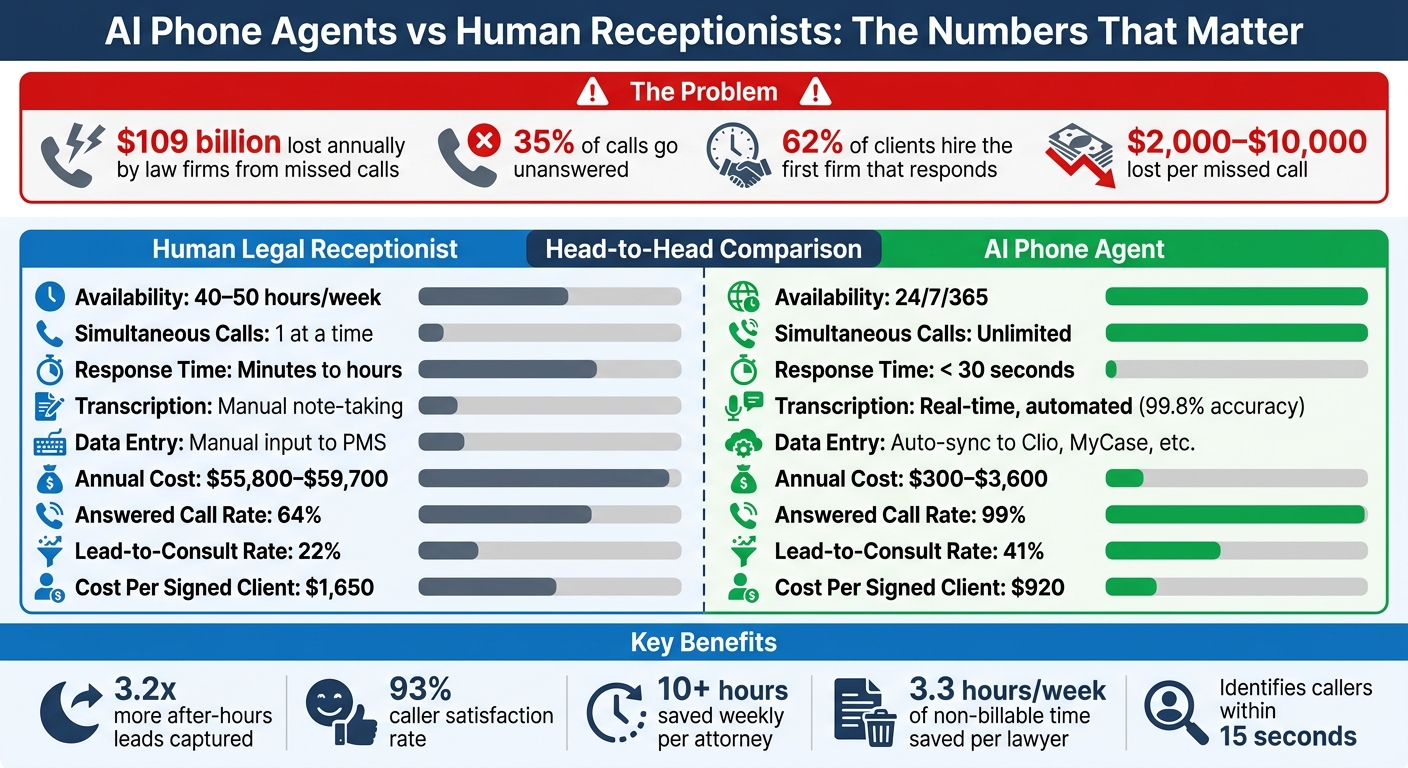
AI Phone Agents vs Human Receptionists for Law Firms: Cost and Performance Comparison
Key Features of AI Phone Agents for Legal Firms
Addressing the challenges legal firms often face, AI phone agents transform missed calls into opportunities. These systems focus on three main areas: intelligent call screening and intake, automated appointment scheduling, and detailed call documentation. Together, these capabilities help capture leads that might otherwise be lost while reducing the administrative workload for attorneys and their teams.
Call Screening and Client Intake
From the moment a call begins, the AI agent works to identify the caller - whether they’re a potential client, an existing client, an opposing counsel, or a vendor - usually within 15 seconds. It then guides the conversation using structured, practice-specific questions, ensuring the intake process is thorough and organized. This eliminates the chaos of unstructured voicemails and scattered notes.
For example:
- Personal injury cases: The AI gathers details about the accident, injuries, and insurance.
- Criminal defense cases: It focuses on arrest details, charges, and court dates.
- Family law cases: It captures custody arrangements and filing deadlines.
This structured intake ensures attorneys receive clear, actionable information right from the start. The system also handles conflict-of-interest checks by collecting the names of all involved parties - opposing parties, co-defendants, etc. - before the attorney engages with the lead. If urgent keywords like "arrested", "custody emergency", or "deportation" are detected, the AI escalates the call immediately via SMS or direct transfer to an on-call attorney.
All collected information is seamlessly synced with practice management tools like Clio, MyCase, PracticePanther, and Lawmatics. This eliminates manual data entry, saving time and reducing errors, while setting the stage for smooth scheduling and documentation.
Appointment Scheduling and Calendar Integration
After intake, the AI simplifies the next step: scheduling consultations. It connects directly with Google Calendar and legal-specific platforms to check real-time availability. During the call, the agent offers open consultation slots, avoiding the dreaded "phone tag" that often leads potential clients to competitors. This is particularly important since 62% of clients hire the first firm that responds to their inquiry.
Once a time is selected, the system sends confirmation emails and texts to both the attorney and the client. It also delivers digital intake forms, ensuring clients are prepared for their consultation. For firms with multiple practice areas, the AI can route calls to the appropriate attorney’s calendar - for example, family law cases might go to one attorney, while criminal defense matters are scheduled with another.
Real-Time Call Transcription and Logging
Every call is transcribed in real time with up to 99.8% accuracy, creating a searchable text record that integrates directly into case files. This detailed documentation helps attorneys review conversations later, often uncovering details that can shape case strategies.
Transcriptions are stored securely, with encryption both in transit and at rest. For firms handling sensitive cases like personal injury or medical malpractice, the system meets SOC 2 Type 2 and HIPAA compliance standards, ensuring client information is protected. Additionally, the AI can monitor calls to ensure legal disclaimers - such as recording notifications - are consistently provided.
| Feature | Human Legal Receptionist | AI Phone Agent |
|---|---|---|
| Availability | 40–50 hours/week | 24/7/365 |
| Simultaneous Calls | 1 at a time | Unlimited |
| Transcription | Manual note-taking | Real-time, automated (99.8% accuracy) |
| Data Entry | Manual input to PMS | Auto-sync to Clio, MyCase, etc. |
| Annual Cost | $55,800–$59,700 | $300–$3,600 |
These transcripts also serve as a reliable record in case of disputes about what was communicated during the initial call. For conflict checks, the AI’s ability to capture opposing party names during the first interaction allows firms to conduct screenings immediately, saving time and avoiding unnecessary consultations.
sbb-itb-ef0082b
Step-by-Step Guide to Setting Up Dialzara AI Phone Agent
You can deploy your AI phone agent in just 15–30 minutes, and you don’t need any technical skills to do it. This setup will allow your system to handle client intake, screen calls, and book consultations 24/7.
Step 1: Create an Account and Set Up Business Details
Start by visiting https://dialzara.com. Click "Sign Up", enter your email and password, and verify your account through the link sent to your inbox. Once logged in, the setup wizard will guide you through entering your firm's details, including name, address, phone number, and practice areas (e.g., family law, personal injury, or criminal defense).
During the training phase, you’ll help the AI learn your firm’s voice by providing 20+ firm-specific terms. Examples include legal phrases like "contingency fee", "deposition", or "child custody modification." You can also upload your FAQ document or describe how you’d like the AI to communicate - whether you prefer a professional, empathetic, or authoritative tone. For instance, a New York family law firm might enter "child custody modification" to ensure the AI handles those inquiries smoothly. This 5–10 minute training can reduce miscommunication during initial calls by up to 85%, according to Dialzara’s documentation.
Step 2: Choose a Voice and Phone Number
In the "Voice & Number" settings, you’ll find 20+ lifelike US English voices to choose from. Options include professional female voices like "Emma" or authoritative male voices like "James." You can tweak the tone, speed, and accent to match your firm’s branding.
For your phone number, you can either select a new US local or toll-free number (costing $1–$5/month) or forward your existing line. If you’re keeping your current number, simply enter it into the settings and enable call forwarding using *72 on most US carriers. For example, a California solo practitioner forwarded their (415) number in under 2 minutes, integrating the system without needing any new hardware.
Once your number is set, configure your call flows to manage how incoming calls are handled and routed.
Step 3: Configure Call Flows and Screening Questions
Head to the "Call Flows" dashboard to create custom scripts using drag-and-drop tools. A typical flow might include: Greeting → Screening → Intake → Action. You can add screening questions like:
- "What type of legal issue are you calling about - divorce, contract dispute, or something else?"
- "Is this urgent, such as an emergency hearing or arrest?"
Set up qualification criteria to route high-value leads (e.g., potential retainers over $5,000) directly to an attorney, while less urgent matters go to voicemail or are scheduled for callbacks. For personal injury cases, you might ask, "When did the incident occur?" to capture key details related to the statute of limitations. Using branching if-then logic can help keep the flow clear and concise. Limiting the script to around 5 screening questions reduces caller drop-off, which studies show can improve lead qualification by roughly 70%.
Step 4: Integrate with Legal Tools and Systems
Under the "Integrations" tab, connect Dialzara to your existing tools. With support for 5,000+ apps via Zapier, APIs, and direct integrations, it’s easy to sync with platforms like:
- Clio for case management
- Google Calendar or Outlook for scheduling
- LawPay for billing
- CRM systems like Salesforce
To set up an integration, choose the app (e.g., "Clio"), authenticate using your API key or OAuth credentials, and map fields such as linking client names to Clio contacts or appointments to calendar events. Test the integration with sample data to ensure everything syncs properly. Starting with calendar integration ensures leads are captured and scheduled right away. This step typically takes 10–15 minutes.
Step 5: Test, Deploy, and Monitor Performance
Before launching, switch to "Test Mode" to run 10–20 sample calls. Simulate different scenarios to ensure the AI captures case types, urgency, and even opposing party names correctly. Check that integrations, like calendar bookings or CRM updates, are working as expected.
For example, a Texas firm discovered a 15% misinterpretation of the term "probate" during testing. After refining their scripts, they reached an accuracy rate of 98%. Once satisfied, switch to "Live Mode" for 24/7 operation.
Keep an eye on performance metrics in the dashboard. Track stats like:
- Answer rate (aim for 95%)
- Average handle time (under 2 minutes)
- Qualification rate (above 80%)
- Drop-off rate (as low as possible)
Review call logs regularly and set alerts for anomalies, such as a high no-answer rate. A mid-sized Florida real estate law firm with 10 attorneys reported handling over 150 calls per month, booking 40% more appointments, and saving about $4,500 per month compared to hiring a part-time receptionist.
Legal Compliance and Ethical Considerations
Using a Dialzara AI phone agent in your legal practice requires careful attention to both legal and ethical standards.
Data Security and Compliance with HIPAA/GDPR
Protecting sensitive client information is critical. Encrypt all call data - both in transit and at rest - to maintain attorney-client privilege [1][4]. When assessing Dialzara, ensure the platform has SOC2 Type 2 certification, which confirms it meets stringent standards for security, availability, and confidentiality [4]. As Marie Chambarlhac, Associate Product, Privacy & Compliance Counsel at Dialpad, emphasizes:
"Security and compliance are non-negotiable for law firms handling sensitive client information" [4].
Establish data retention and deletion policies that comply with state bar requirements or GDPR standards if you serve clients in the EU [2][4]. Verify that your AI provider does not share conversational data with third parties or use it for advertising [4]. If your firm handles health-related legal matters, such as medical malpractice or disability claims, confirm that the platform is HIPAA-compliant. Additionally, notify callers when recording begins, as required by state laws [4].
These security measures are the foundation for responsible AI use in legal settings.
Ethical Use of AI According to ABA Guidelines
Beyond security, ethical AI use is key to maintaining the integrity of your practice. The American Bar Association's Model Rules make it clear that AI agents must never offer legal advice. Program your Dialzara agent to redirect legal questions to a licensed attorney. For example, use a script like: "I can help you schedule a consultation with one of our attorneys who can assist you with that matter" [5].
During intake, the AI should collect the names of all parties involved, including opposing parties, to facilitate conflict-of-interest checks. If a conflict is identified, the AI must halt the intake process and flag the record for attorney review without revealing sensitive client details [1][5]. Attorneys remain accountable for the AI’s actions, so maintain oversight by reviewing transcripts and intake summaries regularly [4].
For transparency, consider programming the AI to disclose its status as a virtual assistant to callers [2].
Maintaining Human Oversight for High-Stakes Decisions
AI should be limited to tasks like intake, routing, and scheduling, leaving substantive decisions to human attorneys [8]. For high-stakes situations such as arrests, emergency hearings, or time-sensitive filings, set up escalation protocols so the AI immediately notifies an on-call attorney via text or call [1].
Incorporate handoff mechanisms to ensure the AI transfers calls to a human operator when it detects caller frustration, complex legal inquiries, or explicit requests to speak with a person [7][8]. Regularly review 10–20 calls per week to identify any instances where the AI might have inadvertently provided legal advice, and use these insights to fine-tune scripts and reduce unnecessary escalations [7][8].
"The pattern that works is AI for triage and capture, humans for substance." - Voiceflow Team [8]
To safeguard sensitive data, implement strict access controls so only authorized personnel can view intake information collected by the AI [4]. Regular staff training on legal ethics is also essential to ensure everyone understands their responsibilities when using AI systems. These steps ensure that Dialzara not only streamlines operations but also adheres to the highest standards of compliance and ethics.
Measuring ROI and Improving AI Phone Agent Performance
When you implement Dialzara, tracking key metrics is essential to maximize your firm's returns. Most legal AI applications deliver measurable results within one to three months - if you focus on the right metrics and consistently fine-tune your setup [10]. Once these metrics are defined, the next step is to monitor and optimize each performance indicator.
Key Metrics to Monitor
Start by establishing baseline metrics like answered call rate, lead-to-consult rate, and cost per signed client to measure progress [10].
Here’s what to keep an eye on:
- Answered Call Rate: The percentage of incoming calls the AI answers. Firms often see this rise to 99%.
- Lead-to-Consult Rate: The proportion of callers who book consultations, which can increase to 41%.
- Cost Per Signed Client: Total marketing and intake costs divided by new cases, with firms reducing this to $920 [11].
| Metric | Human/Traditional Baseline | AI Phone Agent Goal |
|---|---|---|
| Answered Call Rate | 64% | 99% [11] |
| Lead-to-Consult Rate | 22% | 41% [11] |
| Cost Per Signed Client | $1,650 | $920 [11] |
| Response Time | Minutes to hours | < 30 seconds [11] |
| Non-Billable Hours Saved | 0 | 3.3 hours/week per lawyer [9] |
Also, track the human escalation rate - the percentage of calls needing attorney involvement - to identify areas where the AI requires adjustments [12]. After-hours lead capture is another key area; AI solutions can increase these leads by 3.2 times [1].
"The single highest ROI use case is automated intake through an AI voice agent that screens new callers 24 hours a day and only escalates qualified cases to a human attorney." [11]
To calculate financial ROI, use this formula: (Time saved × billable rate) + cost avoidance [10]. For example, if attorneys save 3.3 hours per week on intake calls at $300/hour, that’s $990 in recovered billable time weekly - or roughly $51,480 annually per attorney [9].
Tips for Better Results
For optimal results, review 10–20 call transcripts weekly. This helps pinpoint where callers drop off or where the AI misses key details [11]. Dialzara’s 99.8% accurate transcriptions make this process straightforward [1]. Pay attention to how the AI handles legal terminology, conflict-of-interest checks, and statute of limitations questions.
Refine your intake scripts to improve lead conversion and reduce unnecessary escalations. For instance, if transcripts reveal that insurance details or opposing party names are often missed, update the script to explicitly request this information [1,9]. Regularly update the AI’s knowledge base by adding new FAQs or reflecting recent changes in your practice areas [6].
Monitor escalation triggers closely. If too many routine calls are flagged as urgent, tighten the criteria for escalation. On the flip side, if genuine emergencies (like arrests or time-sensitive filings) aren’t flagged promptly, broaden the keywords that trigger urgency [2].
Consider the example of Martinez & Associates, a mid-sized personal injury firm in Phoenix. In May 2025, they implemented an AI phone system to address over 200 missed calls per year. Within six months, the AI captured 147 additional intakes, converting 89 into retained cases with an average value of $47,000 each. This resulted in $1.39 million in additional revenue. Reflecting on the change, Partner Maria Martinez shared:
"We were losing cases we didn't even know about. Our receptionist would find voicemails from three days prior... Now, our AI receptionist handles the initial conversation immediately, day or night." [13]
Using Dialzara's Dashboard for Analytics
Dialzara’s dashboard provides real-time insights into your AI agent’s performance. For example, it tracks answer times to ensure your firm meets the 30-second response benchmark. Firms that answer within 30 seconds convert at 40%, while response times of five minutes drop conversion rates to just 8% [11].
The dashboard also monitors simultaneous call handling, ensuring no potential client is left waiting during busy periods [6]. Use the "Priority Call Escalations" feature to confirm urgent calls are routed to on-call attorneys, and track after-hours volumes to verify 24/7 coverage [1].
Additionally, audit conflict check reminders to ensure all necessary details - like names, opposing parties, and case specifics - are captured before consultations are scheduled [1]. By syncing the dashboard with Google Calendar or Outlook, you can monitor real-time appointment bookings and address any scheduling issues [6].
The "Test & Refine" feature allows you to tweak screening questions on the fly if analytics show the AI is missing critical details [1,9]. As Shawn Kanungo, a disruption strategist, notes:
"In 2026, 'We are experimenting with agentic AI' stops being an acceptable answer to the board. Every deployment needs a clear ROI thesis." [12]
With Dialzara’s analytics tools, you can demonstrate that ROI thesis while continuously improving your AI agent’s performance.
Conclusion: How AI Phone Agents Transform Legal Firm Operations
AI phone agents like Dialzara are reshaping how legal firms handle client interactions by ensuring no call goes unanswered, reducing operational costs, and meeting the high expectations of today’s clients. Missed calls often mean missed opportunities, especially when potential clients hang up instead of leaving a voicemail. Dialzara steps in to answer every call within 30 seconds, 24/7, guaranteeing that even late-night inquiries receive prompt attention.
By using Dialzara, firms can dramatically cut receptionist expenses - dropping from approximately $55,800–$59,700 annually to just $708–$3,600 per year. On top of that, attorneys gain back over 10 hours weekly for billable work, turning previously lost time into revenue-generating opportunities [3]. Faster response times also lead to higher conversion rates, making instant AI responses a key factor in securing new cases.
The benefits extend beyond operational efficiency, significantly improving client experiences. Dialzara boasts a 93% caller satisfaction rate by providing structured intake processes that capture vital case details. Features like multilingual support allow clients to schedule consultations in their preferred language, while urgency triage ensures emergencies - like arrests or urgent filings - are immediately directed to an on-call attorney [1].
One firm shared the real-world impact:
"We signed 14 new cases in the first month just from calls that would have gone to voicemail before. Dialzara paid for itself in the first week." – Dialzara [1]
Stories like this highlight how AI phone agents help firms retain clients and convert more leads. Firms using Dialzara report capturing 3.2 times more leads after-hours, significantly increasing their ability to serve clients and grow their revenue [1]. Additionally, research shows that 87% of clients who have a positive first interaction with a law firm end up hiring that firm [3].
With results that show up in just weeks, AI phone agents are more than a helpful tool - they’re a game-changer for legal firms looking to secure high-value cases and stay ahead in a competitive market. Dialzara delivers immediate improvements in revenue, efficiency, and client satisfaction, making it an essential solution for modern legal practices.
FAQs
How do I make sure the AI doesn’t give legal advice?
To keep the AI from offering legal advice, set it up to focus on tasks like gathering information, screening clients, and offering general guidance. Make sure the scripts include clear disclaimers stating that the AI cannot give legal opinions or advice. For complex or case-specific questions, program the AI to escalate these directly to a licensed attorney. Additionally, avoid programming it to discuss legal strategies. This approach helps ensure compliance and sets clear boundaries during client interactions.
Will call recordings and transcripts protect client confidentiality?
When managed securely and in line with legal and ethical guidelines, call recordings and transcripts can play a role in protecting client confidentiality. Dialzara follows stringent security measures to ensure sensitive client information is handled with precision and remains confidential at all times.
Can it work with my calendar and case management software?
AI phone agents from Dialzara work effortlessly with your calendar and case management software. They can handle tasks like checking calendar availability, scheduling appointments, and logging case details with ease. This setup simplifies processes such as booking appointments and managing client intake, helping to keep your legal workflows well-organized and running smoothly.
Summarize with AI
Related Posts
AI Phone Agents for Client Intake
Stop losing leads: AI phone agents capture calls 24/7, collect accurate client intake data, and book appointments instantly.
AI Phone Agents for Wealth Managers
24/7 AI phone agents that cut call costs, book more consultations, and integrate with CRMs for wealth management firms.
Real Estate Agents Using AI for After-Hours Calls
AI answering services capture after-hours real estate leads, qualify callers, schedule showings, and sync with CRMs for 24/7 coverage and cost savings.
How AI Handles Legal Jargon in Client Calls
How AI voice agents simplify legal jargon, handle 24/7 client calls, speed intake, produce accurate transcripts, and flag urgent cases for attorneys.