
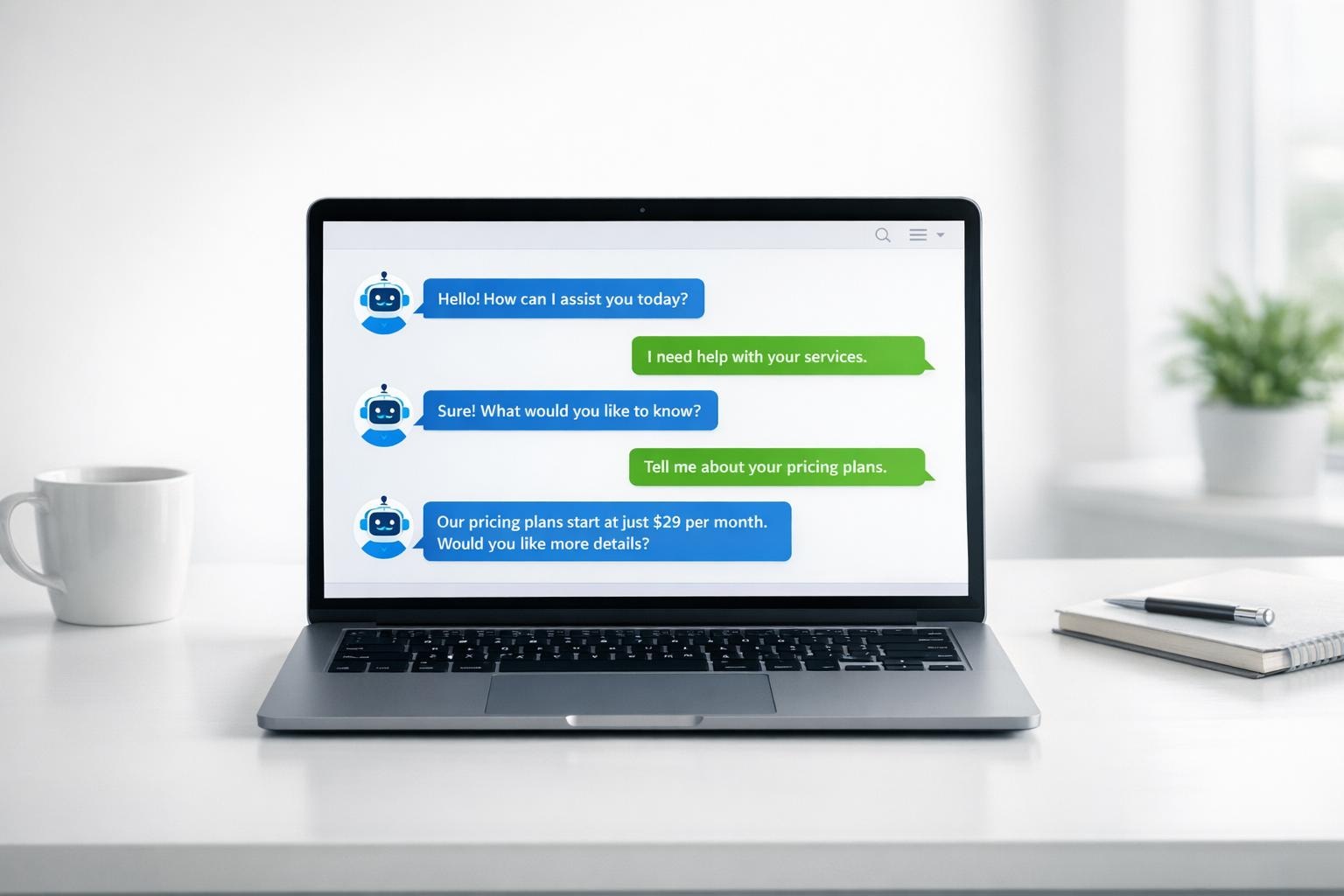
Ultimate Guide to Social Media Chatbots for SMBs
Automate 80% of customer queries and cut support costs while boosting sales with smart chatbots that work around the clock on all your social platforms.

Written by
Adam Stewart
Key Points
- Cut support costs by 60-80% while staying available to customers 24/7
- Connect chatbots to your CRM for unified data and smooth customer handoffs
- Train bots to match your brand voice and handle complex customer questions
- Track ROI with conversion data and automated lead qualification
Social media chatbots are transforming how small businesses interact with customers. These automated tools respond instantly to inquiries, save time, and reduce costs. With features like Natural Language Processing (NLP), 24/7 availability, and integration with platforms like Facebook, WhatsApp, and Instagram, they handle routine tasks, qualify leads, and even assist with sales.
Here’s why they’re essential for small businesses:
- Save Time and Money: Automate up to 80% of common customer queries, cutting costs and freeing up your team.
- Boost Sales: Pre-qualify leads and guide users to purchase decisions. For instance, Beauty Player increased monthly sales by 40% with a chatbot.
- Improve Customer Experience: Respond instantly, manage multiple conversations, and ensure consistent, accurate information.
- Easy Integration: Connect with CRMs, booking tools, and e-commerce platforms for a seamless workflow.
To get started, define your chatbot’s purpose, train it with FAQs, and design simple conversation flows. Regularly track metrics like resolution rates and drop-off points to refine its performance. Chatbots are a practical solution to scale customer engagement and support without increasing overhead.
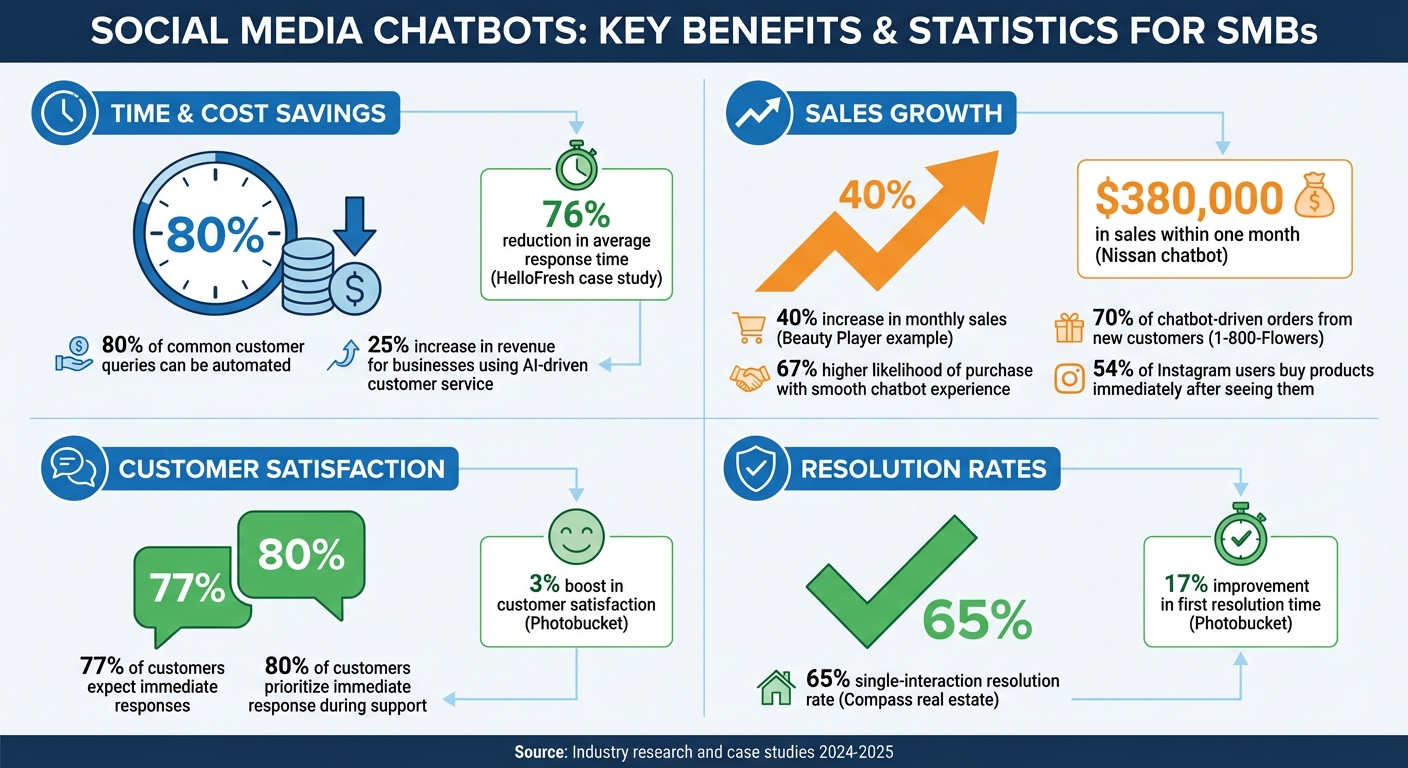
Social Media Chatbot Benefits and Impact Statistics for Small Businesses
What to Look for in Social Media Chatbots
When choosing a social media chatbot, prioritize its ability to understand users, integrate seamlessly with your tools, and reflect your brand’s personality.
Natural Language Processing and AI Features
A good chatbot does more than just match keywords - it understands what your customers mean. With Natural Language Processing (NLP) and Natural Language Understanding (NLU), bots can interpret intent, context, and even subtle nuances. For instance, if one customer asks, "Do you have this in blue?" and another says, "What colors does this come in?", a chatbot with strong NLP will recognize these as similar questions and respond appropriately [4][1][6].
Machine Learning (ML) takes this a step further by enabling the bot to improve over time. Advanced chatbots also leverage Generative AI and large language models (LLMs), such as GPT, to deliver human-like responses and handle more complex interactions [4]. These technologies not only enhance the chatbot’s capabilities but also prepare your business for evolving customer expectations.
These AI-driven features set the stage for a smooth, multi-platform experience.
Cross-Platform Deployment and Integration
Your chatbot should work wherever your customers are. Whether it’s Facebook Messenger, Instagram, WhatsApp, Telegram, or X, deploying your bot across multiple platforms ensures you’re engaging with users in their preferred spaces [2][1]. This approach creates a seamless experience as your business expands.
Integration with your existing tools is equally important. For example, connecting your chatbot to CRMs like Salesforce or Zoho CRM provides a full view of each customer, including their past interactions, purchase history, and preferences. This allows for personalized interactions [2][4][6]. Similarly, integrating with helpdesk systems like Zendesk or scheduling tools like Zoho Bookings enables the bot to handle tasks like resolving tickets or booking appointments, freeing up your team for more complex challenges [2][4].
"A chatbot is only as effective as its integration with your existing systems and workflows." - SmythOS [6]
For e-commerce, chatbots integrated with platforms like Facebook Shops allow customers to browse and buy products directly within the chat, making the shopping experience more convenient [5]. Additionally, using a centralized dashboard or a "Smart Inbox" lets human agents seamlessly take over conversations when needed, ensuring continuity and context [4][1].
Customization and Brand Voice
Your chatbot should feel like an extension of your brand. Customizing its responses ensures it matches your business’s tone and personality [4]. According to The Sprout Social Index™, personalized customer service will be a top priority for consumers by 2025 [4].
Customization goes beyond just words. Adding custom avatars or media, like photos and GIFs in welcome messages, can make interactions more engaging and approachable [4].
Tone and empathy are also key. By aligning your chatbot’s tone with your customers’ preferences, you can build trust and strengthen relationships [8]. Be upfront about the bot’s automated nature to set the right expectations and maintain transparency [1][2]. And, of course, always include a clear option for customers to connect with a human agent for issues the bot can’t resolve.
Once these features are in place, your next step is to focus on setup and ongoing improvements.
How to Set Up and Improve Social Media Chatbots
To get started, define your chatbot’s purpose - whether it’s gathering leads, answering FAQs, or scheduling appointments - and build its functionality with those goals in mind.
Training Your Chatbot with Business Information
A chatbot’s effectiveness relies heavily on the quality of its training data. To ensure accuracy, sync your chatbot with your knowledge base, including FAQs, catalogs, pricing details, and policies. This allows the bot to use natural language processing (NLP) to understand and respond to different ways people might phrase similar questions. For example, whether someone asks, "How much does this cost?" or "What's the price?", an NLP-powered bot will recognize these as the same inquiry.
The more real customer queries you use to train your chatbot, the better it becomes at understanding intent and providing relevant responses. Since chatbots can handle up to 80% of routine questions instantly [1], investing time in thorough training can save significant time and resources.
Once trained, the next step is to design conversation flows that shape how the bot interacts with users.
Creating Conversation Flows
With a solid training foundation, you can create conversation flows that guide users through purposeful interactions. Use straightforward decision logic to map out how the bot welcomes users, presents options, and directs them based on their choices. Many platforms offer templates for common use cases - like e-commerce support or real estate queries - so you don’t have to start from scratch.
Take HelloFresh as an example. They developed a Facebook Messenger bot to manage routine questions, reducing their average response time by 76% [5]. Their bot’s conversation flows anticipated follow-up questions and guided users to quick resolutions. For instance, when someone asked about delivery times, the bot followed up with, "Would you like to track your current order?" and provided a simple yes/no option.
Each conversation flow should have a clear objective, whether it’s qualifying a lead or solving a customer issue. Nissan adopted this approach with a chatbot that identified potential buyers based on their intent, leading to $380,000 in sales within a single month and increasing organic conversions [5].
To make interactions feel more engaging, include elements like photos, GIFs, and up to three call-to-action buttons in your welcome messages [4]. These additions mirror how people typically communicate on social media, making the experience more relatable and enjoyable.
Setting Up Handoff Protocols
Even the best chatbot isn’t perfect. It’s essential to have a system in place for escalating complex or unresolved issues to a human agent. Set up triggers that detect frustration, complicated queries, or phrases like "speak to a person", and automatically route users to live support.
"The sweet spot for me is a chatbot that feels warm and conversational, but never tries to pretend it's actually human."
– Mimi Nguyen, Founder, Cafely [6]
Be transparent about your availability. Let users know your business hours and provide clear expectations for response times when live agents aren’t available. For example, you could say, "Our team is available Monday through Friday, 9:00 AM to 6:00 PM EST. I’ve created a ticket for your question, and someone will get back to you within 24 hours."
Finally, always offer an easy way for users to connect with a human agent. This ensures they never feel stuck in an endless loop of automated responses.
How Small Businesses Use Social Media Chatbots
Once your chatbot is up and running with its conversation flows in place, it’s time to let it do its magic. Small businesses are using chatbots to capture leads, handle customer inquiries, and even process orders 24/7. Here’s how these tools are reshaping lead generation, customer support, and sales.
Lead Generation and Qualification
Think of social media chatbots as your round-the-clock sales assistant. They engage with prospects the moment they show interest - whether it’s through clicking on an ad, leaving a comment, or sending a direct message. Instead of relying on static forms, chatbots ask qualifying questions in real time, making the interaction feel more natural and immediate. Once leads are identified, they’re sent directly to your sales team. Want to boost lead capture? Program your bot to offer incentives like promo codes or exclusive content in exchange for contact details. You can even integrate the chatbot with your CRM, such as Salesforce or Zoho CRM, to ensure every lead is logged and ready for follow-up. Some bots take it a step further by scheduling demos or appointments right within the chat interface [2][5].
Automated Customer Support
Chatbots are more than just lead generators - they’re also game-changers for customer support. They’re excellent at handling repetitive questions like “What’s your return policy?” or “When will my order arrive?” By automating responses to these FAQs, your team is freed up to focus on more complex customer issues. In fact, chatbots can resolve up to 80% of routine inquiries instantly [1]. That’s especially important when 77% of customers expect immediate responses when they reach out to companies [7]. Acting as your first line of support, a chatbot can provide instant answers or seamlessly pass more complex issues to a human agent. Businesses using AI-driven customer service on social media have even reported a 25% increase in revenue compared to those that don’t [7]. Just remember, transparency is key - make it clear that users are interacting with an AI assistant and always provide an easy way for them to connect with a human when needed [2].
E-Commerce and Appointment Booking
Chatbots aren’t just about answering questions - they’re also driving sales and bookings. For small businesses selling products or services, chatbots can turn conversations into transactions. They allow customers to browse, get personalized recommendations, and even make purchases directly through platforms like Instagram or Facebook Messenger [5][9]. This is a big deal, especially since 54% of users admit to buying a product immediately after seeing it on Instagram [9]. By integrating chatbots into the sales process, businesses are seeing higher conversion rates while cutting costs. For service-based businesses, chatbots can sync with booking systems like Zoho Bookings to share available time slots and schedule appointments automatically. A great example is 1-800-Flowers, whose AI assistant GWYN (Gifts When You Need Them) on Facebook Messenger offered personalized gift suggestions. The result? 70% of chatbot-driven orders came from brand-new customers [4].
sbb-itb-ef0082b
Measuring and Improving Chatbot Performance
Launching a chatbot is just the first step - its true value lies in how well it performs and how effectively you can refine it. Without tracking the right metrics, you’re essentially flying blind. Most chatbot platforms provide built-in analytics, offering insights into both successes and shortcomings. Let’s dive into the key metrics that can help you understand your bot’s performance.
Key Metrics to Track
Start with interaction volume, which measures the total number of conversations your bot handles. This helps you gauge whether customers are actively engaging with it and gives a sense of demand. Another crucial metric is the resolution rate, which shows the percentage of queries your bot resolves without needing human assistance. A low resolution rate could mean your bot needs better training or improved conversation flows.
First response time (FRT) is equally important. Research shows that 80% of customers prioritize getting an immediate response during support interactions [10]. Your bot should greet users and provide initial answers within seconds to meet these expectations. Keep an eye on drop-off points, which are stages where users abandon the conversation. These indicate areas of friction or confusion that need to be addressed. For service-oriented businesses, the lead qualification rate is a valuable metric, showing how well your bot captures and categorizes potential leads for your sales team. Lastly, analyze frequently used quick replies to understand which conversation paths are most popular and consider highlighting these in your bot’s welcome message.
By focusing on these metrics, you’ll not only measure performance but also uncover actionable insights to refine your chatbot’s flows.
Using Analytics to Improve Chatbot Flows
Regularly reviewing logs and identifying drop-off points can help you pinpoint knowledge gaps or inefficiencies in your chatbot’s scripts [1][3]. If certain stages show high drop-off rates, consider simplifying the conversation flow or adding more relevant options to keep users engaged.
This strategy has delivered measurable results for businesses. For example, Photobucket saw a 3% boost in customer satisfaction and a 17% improvement in first resolution time by continuously fine-tuning their AI support agents [3]. Similarly, Compass, a real estate brokerage, used analytics to optimize inquiry routing, achieving a 65% single-interaction resolution rate and a 9% overall increase in resolution rates [3].
"It's really about knowing who your customers are when they're contacting support so that you can get them to the right person and answer them the right way" [3].
A/B testing different conversation scripts is another effective way to identify what works best. Successful businesses also track escalation patterns - monitoring when and why a bot hands off to a human agent. This helps identify complex issues that the bot isn’t yet equipped to handle [11]. By continually updating your bot’s knowledge base with these insights, you’ll ensure it becomes more effective over time.
Getting Started with Social Media Chatbots
Now that you’re familiar with chatbot features and setup basics, it’s time to put your plan into action. Start by defining a clear goal for your chatbot. Are you looking to generate leads, automate customer support, or drive more sales? A well-defined objective ensures your bot stays focused and delivers results [5].
Next, choose a platform that works seamlessly with the channels your customers prefer. Make sure it integrates smoothly with tools like your CRM or helpdesk to keep everything connected [4][1].
When designing your chatbot, keep conversation flows simple and structured. Use clear decision trees, and don’t forget to set up handoff protocols for complicated questions that require human assistance [4][1][2]. Personalize your bot by giving it a name, avatar, and a welcoming message that aligns with your brand’s tone. These small touches can make interactions feel more authentic [4][2].
Before launching, take the time to thoroughly test your chatbot. Preview conversations to catch awkward phrasing or potential dead ends. If you’re just starting out, pre-designed templates tailored to your industry can make setup faster and easier [1][5].
Remember, customer engagement doesn’t happen on just one channel. To provide round-the-clock support, consider pairing your social media bot with a voice AI tool like Dialzara to handle phone inquiries as well [13].
Finally, launch with a use case that will have the biggest impact. Keep an eye on analytics and tweak conversation flows based on how users actually interact with the bot. Research shows that a smooth chatbot experience can increase the likelihood of a purchase by 67% [12].
FAQs
How can I select the best chatbot platform for my small business?
To pick the best chatbot platform for your small business, start by defining what you need it to do. Are you looking for something to handle FAQs, gather leads, schedule appointments, or even manage sales on channels like Facebook Messenger, Instagram DM, or WhatsApp? Focus on platforms that offer AI-driven natural language understanding, customizable templates, and intuitive tools for creating and tweaking responses.
It's also important to ensure the chatbot integrates smoothly with tools you already use - like your CRM, email marketing software, or e-commerce systems - so your customer data remains connected and organized. Think about scalability to manage higher message volumes as your business grows, pricing plans that align with your budget, and built-in analytics to monitor key metrics like response times and customer satisfaction. Having dependable customer support and access to helpful resources can make a big difference in the long run.
Once you've shortlisted a few platforms, take advantage of free trials or demos to test them out. Start with a small pilot program to see how the chatbot performs with tasks like updating orders or scheduling appointments. Compare the costs and results to determine which platform fits your needs best. A good chatbot should be easy to set up, budget-friendly, and ready to grow alongside your business.
How can I effectively train a chatbot with my business information?
To build a chatbot that truly reflects your business, you need to start by defining its role. Will it assist with customer support, qualify leads, or manage appointment scheduling? Once you’ve nailed down its purpose, the next step is creating a targeted knowledge base. Use real customer interactions - emails, chat logs, or support tickets - to pinpoint frequently asked questions and craft clear, on-brand responses.
Feed these FAQs into the chatbot’s training model and test it on platforms like Facebook, Instagram, or X. This helps ensure it can handle different ways customers might phrase their questions. After launching, adopt a continuous improvement approach. Monitor conversations, update the bot with fresh examples as customer language evolves, and remove outdated responses. For more complicated issues, allow human agents to step in, and use their input to further refine the bot’s accuracy. Keep an eye on metrics like resolution time and customer satisfaction to ensure your chatbot stays effective and aligned with your business goals.
How can I track and improve my social media chatbot’s performance?
To evaluate how well your chatbot is performing, start by examining key metrics like average response time, first-reply speed, and resolution time. These will give you a sense of how efficiently the bot manages customer inquiries. Pay attention to the first-contact resolution rate, which shows how often the bot resolves issues without needing human assistance. Additionally, track customer satisfaction (CSAT) scores or post-interaction ratings to understand how users feel about their experience. Metrics like fallback rates (how often the bot escalates to a live agent) and engagement stats - such as messages per session and conversation completion rates - can also highlight areas that need fine-tuning.
To boost your chatbot’s performance, identify where users tend to drop off and adjust its language understanding by expanding its intent library or training it with more natural-language data. Experiment with different response styles, button designs, or conversation flows to find what works best for your audience. Keep your scripts and FAQs up to date to address evolving customer needs, and integrate human support for more complex queries when needed. Make it a habit to conduct monthly reviews of your metrics - this helps you track progress, recognize achievements, and set new goals, ensuring your chatbot keeps pace with your business growth.
Summarize with AI
Related Posts
AI Social Media Tools for SMBs: Comparison
Explore essential AI social media tools for SMBs, comparing features like content creation, scheduling, and analytics to boost engagement and efficiency.
Top AI Tools for Personalized Customer Service
Explore how AI tools enhance personalized customer service for SMBs, from chatbots to email marketing, while saving costs and improving efficiency.
How Chatbots Boost Social Media Engagement
Explore how chatbots enhance social media engagement by offering instant support, personalized experiences, and valuable customer insights.
Ultimate Guide to AI Social Media Automation
Explore how AI social media automation tools can streamline content creation, scheduling, and performance analysis for small and medium-sized businesses.